
Free invoicing software that keeps the books
IQ Books by ReconcileIQ is free UK invoicing software that does the bookkeeping behind every invoice. RiQ drafts the invoices, your customer pays by card from a link or the QR code, and the payment is receipted, allocated and matched to the bank for you. You check it and sign it off.
Invoices, quotes, credit notes and card payments are on the free plan, with no limit on how many invoices you raise.
How IQ Books does it
From draft to paid, without the admin
Invoicing software usually stops at the invoice. IQ Books carries on: it drafts the invoice, collects the money, books it and chases what is late, and you approve each step.
- Draftedfrom an order, your time or an accepted quote
- Sharedas a pay link, a PDF with a QR code, or by email
- Paidby card or transfer, deposits and part payments too
- Bookedreceipted, allocated and matched to the bank line
01
Drafted for you, checked by you
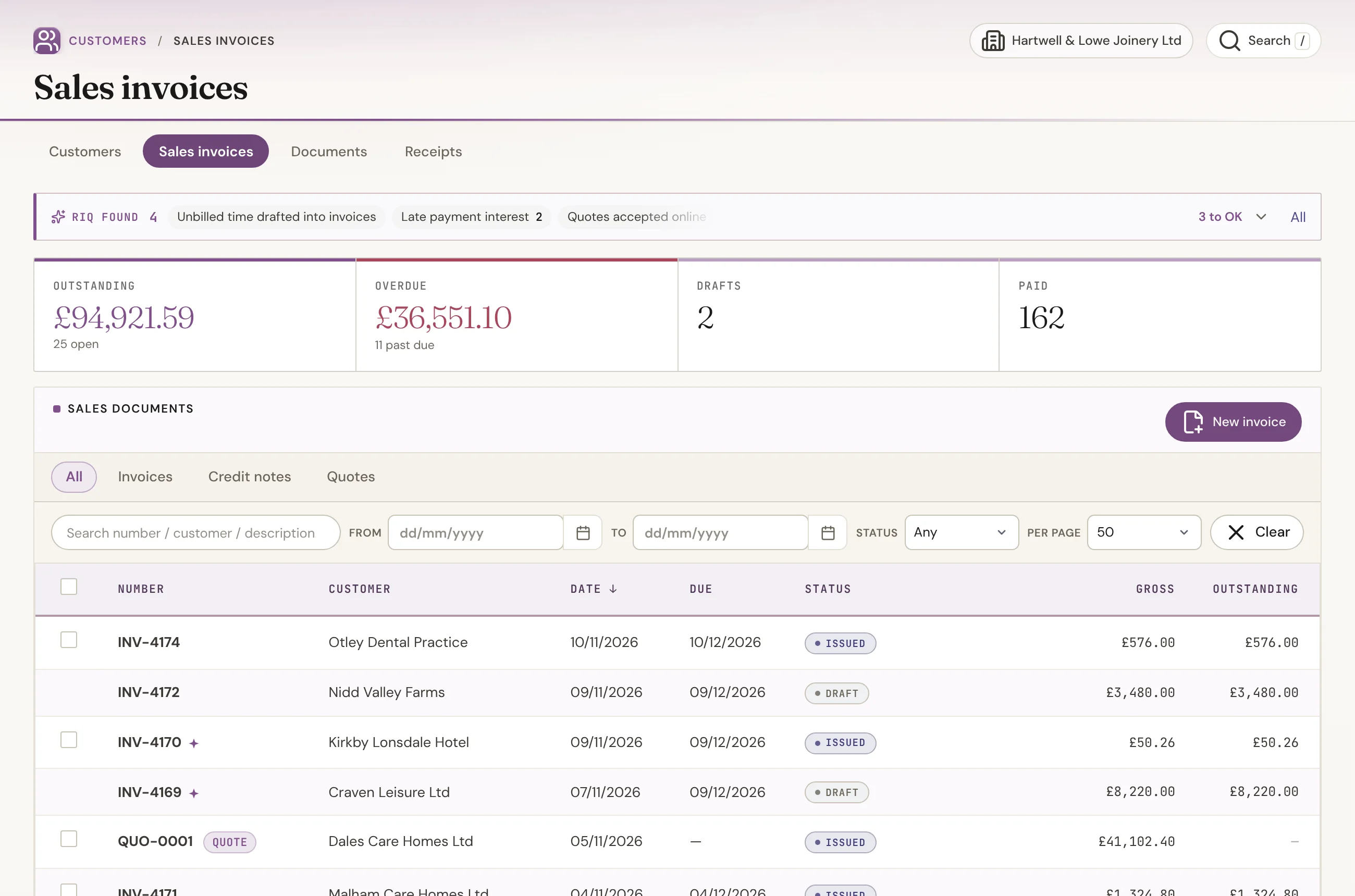
RiQ, the assistant built into IQ Books, drafts the invoices you would otherwise type. A customer’s purchase order emailed to your IQ Books address becomes a draft with your number and their order as the reference. Unbilled project time becomes an invoice, a quote your customer accepts online turns into one, and when you have billed a customer the same amount three months running, RiQ drafts this month’s and suggests a recurring template.
- Customer orders emailed in become draft invoices (reading a document uses credits)
- Project time ready to bill, at the rates you set
- Quotes accepted online become drafts, with the customer’s name and the time kept
- Nothing is issued or sent until you say so
02
Paid by card, from a link or the page itself
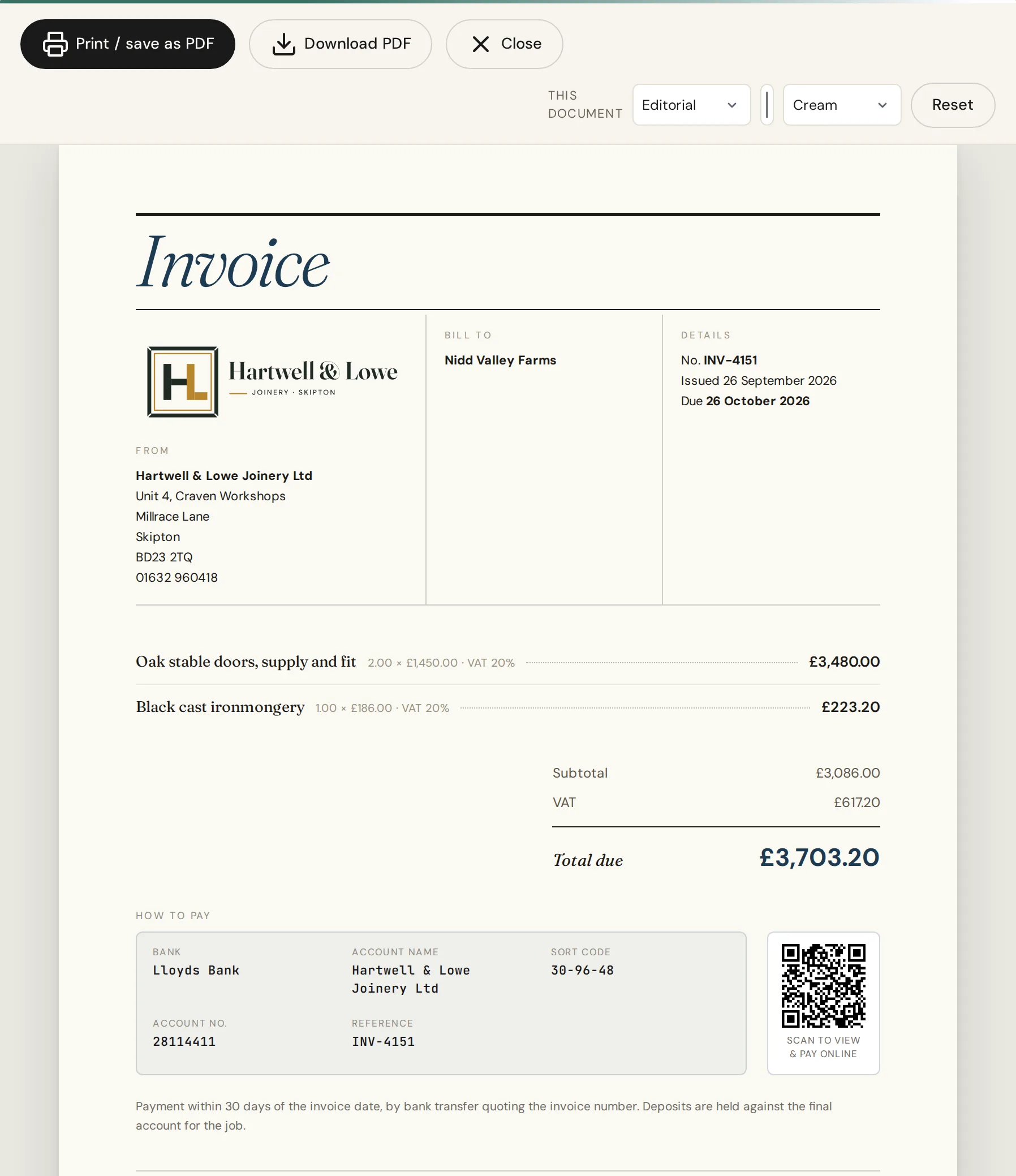
Connect your own Stripe account and every invoice gets a secure pay page. Share the link from your phone or your inbox, or send the PDF: it carries a scan-to-pay QR code, so even a printed invoice can be paid in seconds. Ask for a deposit up front and the pay page leads with it, with the full balance one click away.
- A pay page for every invoice, shared by link
- Scan-to-pay QR code on the PDF and the printout
- Card payments through your own Stripe account (Stripe’s fees apply), with your bank details printed for transfers
- Deposits as a percentage or a fixed amount
03
The payment books itself
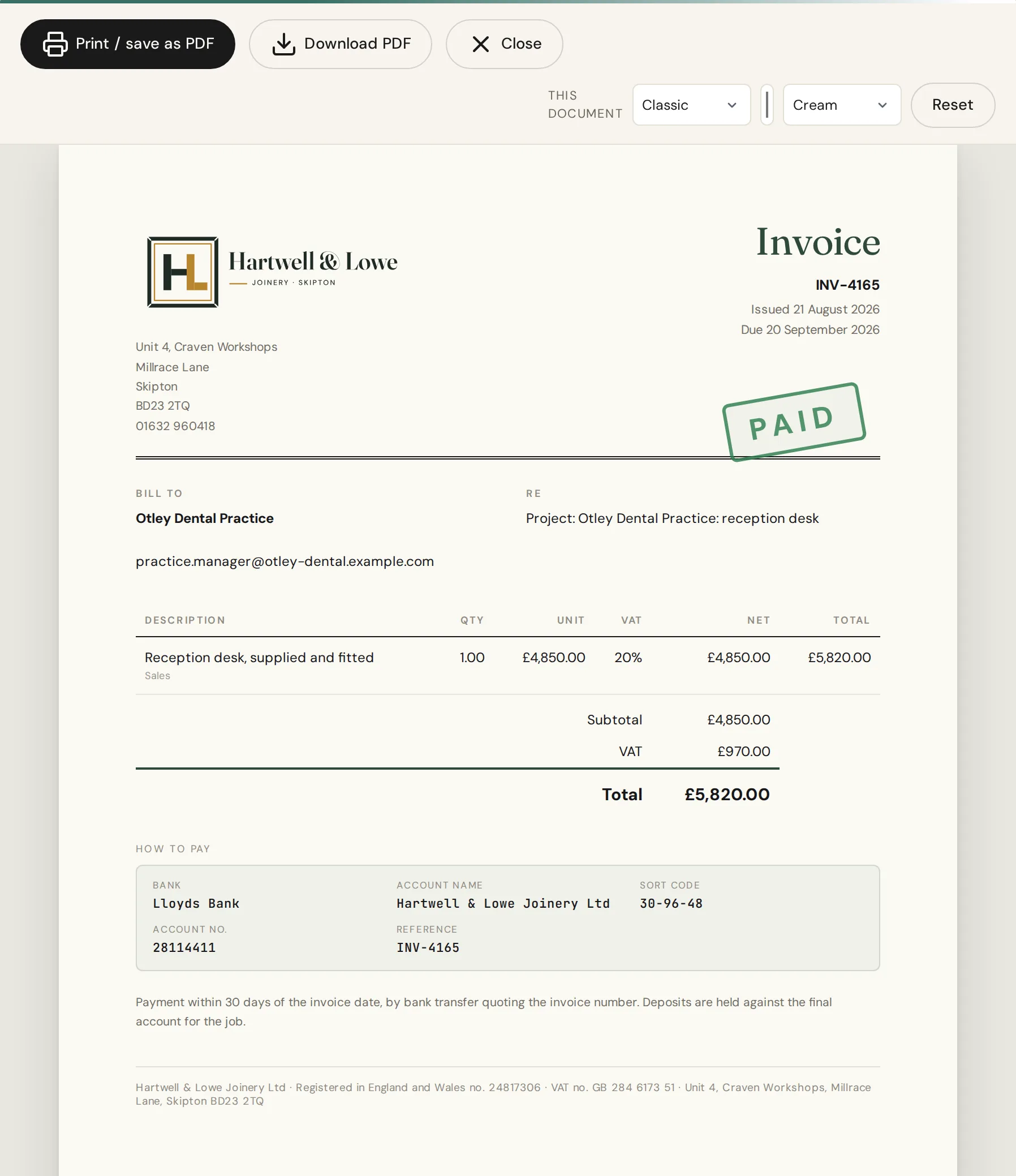
When a customer pays on the pay page, the receipt lands in your books against the invoice and Stripe’s fee is booked as a bank charge. When Stripe pays out, the payout is posted as a transfer to your bank that matches the statement line, so nothing is counted twice or reconciled by hand. A bank transfer that matches an open invoice is offered as its payment in one click, and CodeIQ, our coding engine, picks out invoice payments among your bank lines.
- Paid, part paid and overdue, kept right as money arrives
- Overpayments held as customer credit, or refunded
- Foreign currency receipts with the exchange difference posted
- Aged debtors and customer statements built from the same ledger
04
Retainers and subscriptions, on their own
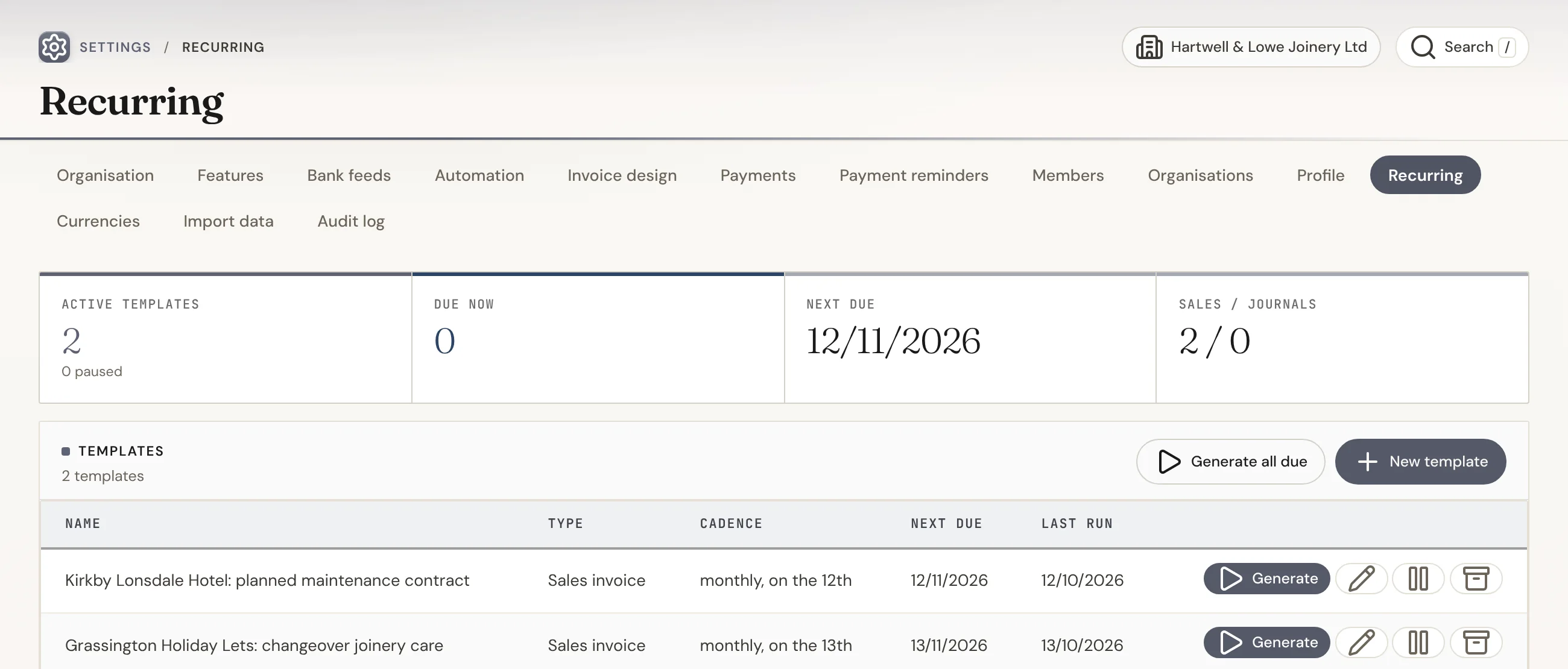
Set a recurring invoice once and IQ Books raises it on the same day each month, or every so many days, until an end date if you give one. Turn on automatic collection and your customer saves a card on the first invoice’s pay page; every invoice after that is charged, receipted and allocated by itself. A customer on stop, or over their credit limit, is held back until you decide.
- Monthly on the same day, or every 7, 14 or so many days
- Issue automatically, or keep each one as a draft to check
- Card collection through your Stripe account, with the customer’s consent
- Credit limits and on-stop customers held, not invoiced
05
Chasing, done for you
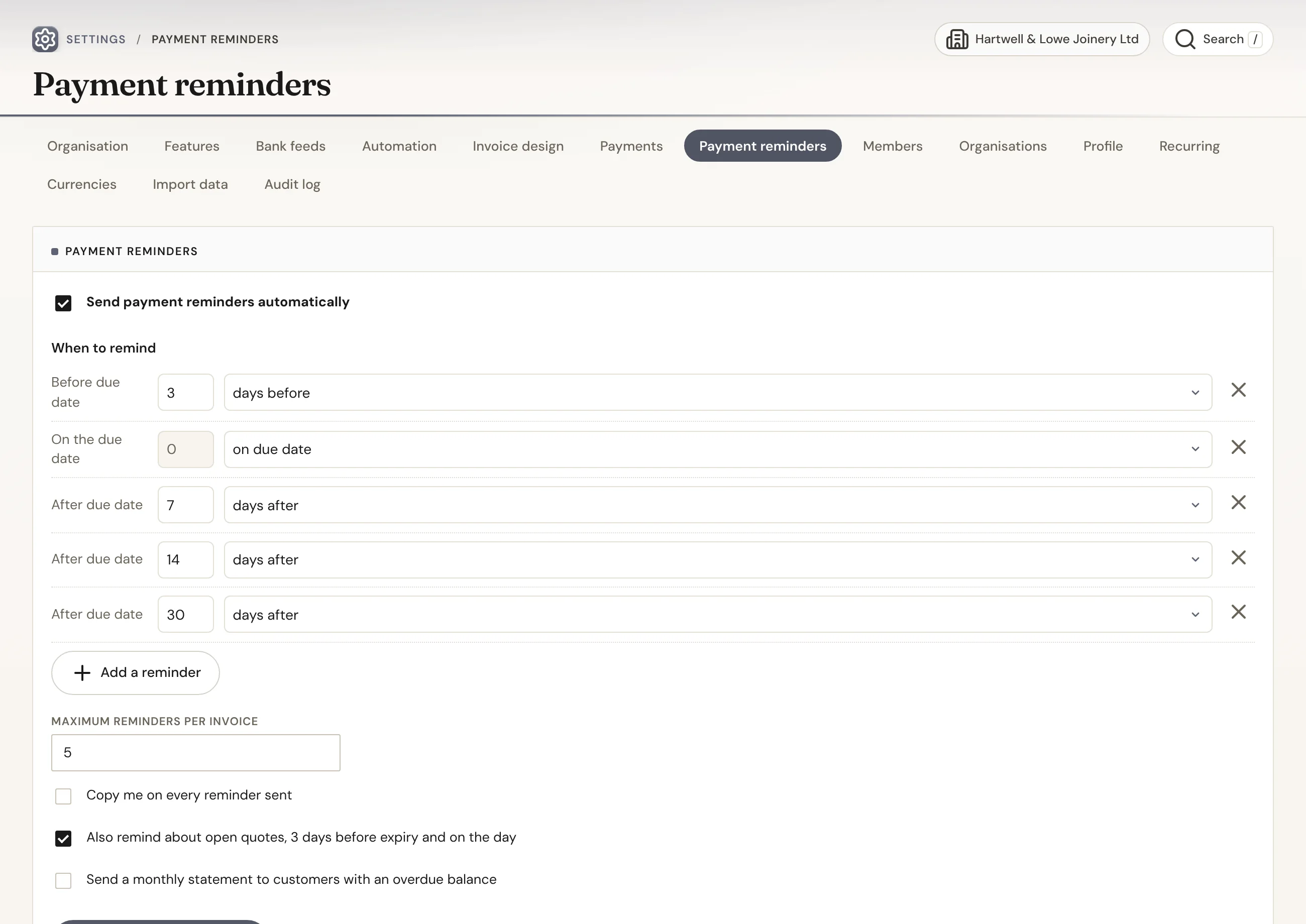
On a paid plan IQ Books emails the invoice and then follows it up: reminders before the due date, on it, and up to 120 days after, which stop on their own once it is paid. Quotes are reminded before they expire, customers can get a statement each month, and you can charge late payment interest. Every week RiQ lists who to chase and the next step for each.
- Reminders on the schedule you choose, stopped by the payment
- Monthly statements and late payment interest, per customer
- Customers marked don’t chase are left alone
- Bad debts written off with the VAT reclaimed when HMRC allows
06
VAT invoices that are right every time
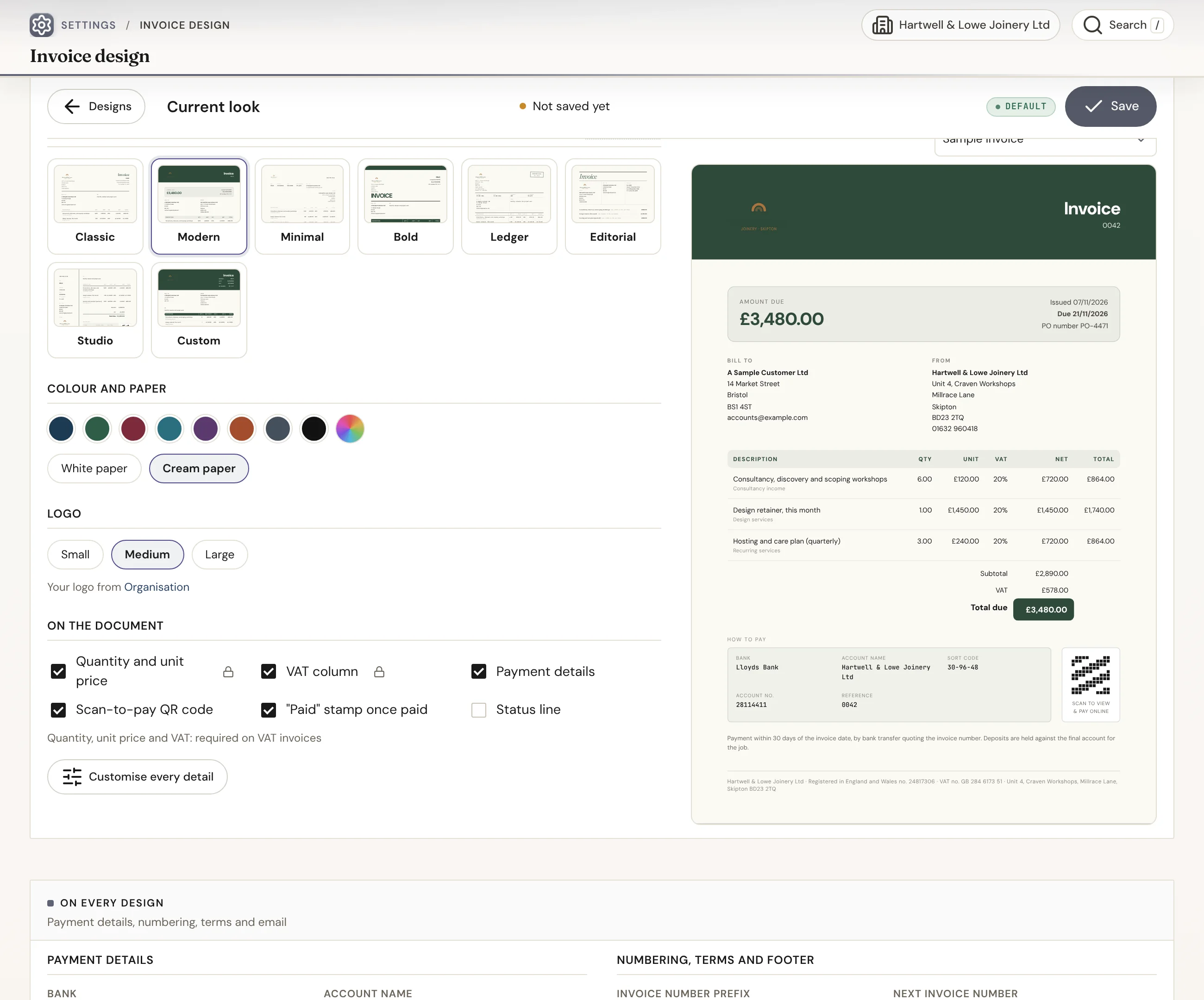
For a VAT-registered business, every line shows the quantity, unit price, VAT rate and net amount, and your VAT and company numbers always print, whatever the design. Reverse charge lines carry the note HMRC requires, foreign currency invoices show the VAT in sterling, and the VAT on every invoice goes straight to your VAT return, filed to HMRC from the same ledger.
- Seven designs, your logo and brand colour, on paper, screen and pay page
- Numbers in sequence, never reused, voided invoices included
- Credit notes that reverse the sale and the VAT exactly
- Multi-currency invoicing with the exchange rate on the invoice
Filing VAT too? See free MTD software.
Choosing
Invoicing software or an invoice generator?
Both make an invoice. Only one keeps track of it afterwards.
An invoice generator, like our free invoice template, is the right tool for a one-off: fill it in, download it, send it. The moment you invoice regularly, the work moves to what happens next: which number comes after the last one, who has paid, who is late, and whether the money in the bank ties back to the invoices.
What invoicing software should do
- Number and store every invoice, so nothing is duplicated, lost or reused.
- Get you paid faster, with a way for the customer to pay from the invoice itself.
- Know what is owed: paid, part paid and overdue, by customer, without a spreadsheet.
- Chase for you, politely and on a schedule, and stop when the money arrives.
- Get the VAT right if you are registered, and carry it to your VAT return.
- Keep the records: your sales invoices are part of the digital records Making Tax Digital asks for, and figures typed from one program into another do not count as a digital link.
That last point is why IQ Books puts the invoicing inside the ledger rather than beside it. The invoice, the payment and the VAT are one set of records, so there is nothing to export, import or keep in step.
What it costs elsewhere
Invoicing usually comes inside an accounting subscription. Xero’s entry plan, Ignite, is £18 a month and allows 20 invoices a month; QuickBooks Simple Start is £16 a month for one user (both checked on their UK pricing pages on 5 October 2026, excluding VAT). IQ Books’ free plan has no invoice limit, and paid plans start at £10 a month. We set out the full comparison in Xero vs QuickBooks in the UK, and the third option.
Need a pro forma? IQ Books has no separate pro forma type: a quote, or an invoice with a deposit request, does the job. Our guide explains what a pro forma invoice is and how VAT applies.
Sources: Xero UK pricing and QuickBooks UK pricing, checked 5 October 2026; VAT Notice 700/22 on digital records and digital links.
Invoicing, free
- Unlimited invoices, quotes and credit notes in seven designs, with your logo and brand colour
- Pay pages, share links and scan-to-pay QR codes, with card payments through your own Stripe account
- Deposits, recurring invoices and automatic card collection
- The whole ledger: customers and suppliers, bank, VAT returns and Making Tax Digital filing
Free invoices carry a small “Sent with IQ Books” line. Typing is always free; RiQ’s automation, such as reading an emailed order, draws on 1,000 free credits. No card needed.
Add email, reminders and your own look
- IQ Books emails your invoices, quotes and statements, and shows when each is opened
- Automatic payment reminders on your schedule
- No “Sent with IQ Books” line on your documents
- The full design studio: saved designs, a design per customer, custom layouts, and Match my invoice, which copies the look of the invoice you send today (a match uses credits)
Paid plans carry monthly credits for the automation. See pricing.
Who it suits
Invoicing for the way you work
The same free plan, whether you send three invoices a month or three hundred.
Sole traders and freelancers
Invoice from your phone, take card payments without a card machine, and keep the records your quarterly MTD updates are built from. How IQ Books compares for sole traders.
Trades and construction
Deposits before you order materials, and domestic reverse charge lines with the wording HMRC expects. On a paid plan, add a job address or site field to your invoice design.
Consultants and agencies
Bill project time at your rates, run retainers on a schedule, and invoice overseas clients in their currency.
Limited companies
VAT invoices, credit control, statements and aged debtors from one ledger, which also prepares your year-end accounts for Companies House.
Questions
Invoicing software, answered
About invoicing in IQ Books, and invoicing in general.
Is there free invoicing software in the UK?
Yes. IQ Books by ReconcileIQ is free invoicing software for UK businesses: invoices, quotes and credit notes, pay links, scan-to-pay QR codes and card payments through your own Stripe account are all on the free plan, with no limit on how many invoices you raise. Having IQ Books email invoices and reminders to your customers is on paid plans, from £10 a month.
Can I send invoices for free with IQ Books?
Yes. On the free plan you raise the invoice, then share its pay link from your own email, text or WhatsApp, or download the PDF, which carries a scan-to-pay QR code. Having IQ Books send the email for you, with automatic reminders after it, is on paid plans from £10 a month.
How do I send an invoice?
Give the invoice a unique number, your business name and address, the customer’s details, the date of supply, what you supplied, the amount due and the payment terms (and the VAT details if you are VAT registered). Then send it by email as a PDF or a link. In IQ Books you issue the invoice and either email it from the app on a paid plan or share its pay link and PDF yourself on the free plan. Our guide to how to write an invoice covers each field.
Can my customers pay an invoice by card?
Yes. Connect your own Stripe account and every invoice gets a secure pay page, reached from the link you share or the QR code on the PDF. The money goes to your Stripe account and on to your bank, and Stripe’s usual fees apply. You can also ask for a deposit, and your bank details print on every invoice for customers who prefer a transfer.
Does IQ Books record the payment for me?
Yes. A card payment on the pay page is recorded against the invoice, with Stripe’s fee booked as a bank charge, and Stripe’s payout is posted as a transfer to your bank that matches the statement line. A bank transfer that matches an open invoice is offered as that invoice’s payment in one click, and part payments and overpayments are kept on the customer’s account.
Can I set up recurring invoices?
Yes, free. A recurring template raises the invoice on the same day each month or every so many days, until an end date or a number of invoices if you set one. Turn on Collect payment automatically and the customer can save a card on the first invoice’s pay page; every invoice after that is charged, receipted and allocated by itself through your Stripe account.
Does IQ Books produce VAT invoices?
Yes. For a VAT-registered business every line shows the quantity, unit price, VAT rate and net amount, and your VAT number always prints, as a VAT invoice must. Reverse charge lines carry the reverse charge note, foreign currency invoices show the VAT in sterling, and the VAT on each invoice goes straight to your VAT return.
Can I keep my existing invoice numbers?
Yes. Set your prefix and the next number under Invoice design, or type your own number on an invoice, and the sequence carries on from there. Each number is used once, across invoices, credit notes and quotes, and a voided invoice keeps its number so it is never reused.
Can I turn a quote into an invoice?
Yes. Your customer can accept a quote online by typing their name, and it becomes a draft invoice with the same lines and prices for you to check and issue. You can also mark a quote accepted yourself and convert it in one click.
What is the difference between invoicing software and accounting software?
Invoicing software makes and sends invoices; accounting software keeps the books. IQ Books does both: every invoice you issue posts to a double-entry ledger with its income and VAT, so your aged debtors, VAT return, profit and loss and Making Tax Digital filing are built from the same records with nothing copied across.
Can I use IQ Books on my phone?
Yes. IQ Books runs in your phone’s browser with the same account, so you can raise an invoice on site and show the customer the QR code to pay there and then.
Send the invoice. IQ Books does the rest.
RiQ drafts it, your customer pays from the link, and the payment lands in the books matched to the bank. Invoicing and the whole ledger are free. Emailing invoices and automatic reminders come with paid plans, from £10 a month.