VAT calculator: add or remove VAT
Type an amount, say whether it already includes VAT, and pick the rate. You get the net, the VAT and the gross, rounded to the penny, with the working shown so you can check it against your own sums.
Every sum runs in your browser. Nothing you type is sent to us or saved.
IQ Books by ReconcileIQ
What IQ Books does with your VAT
This calculator does one sum at a time. IQ Books works the VAT out on every transaction as it is recorded, keeps the return current all quarter and files it to HMRC, and all of that is on the free plan.
01
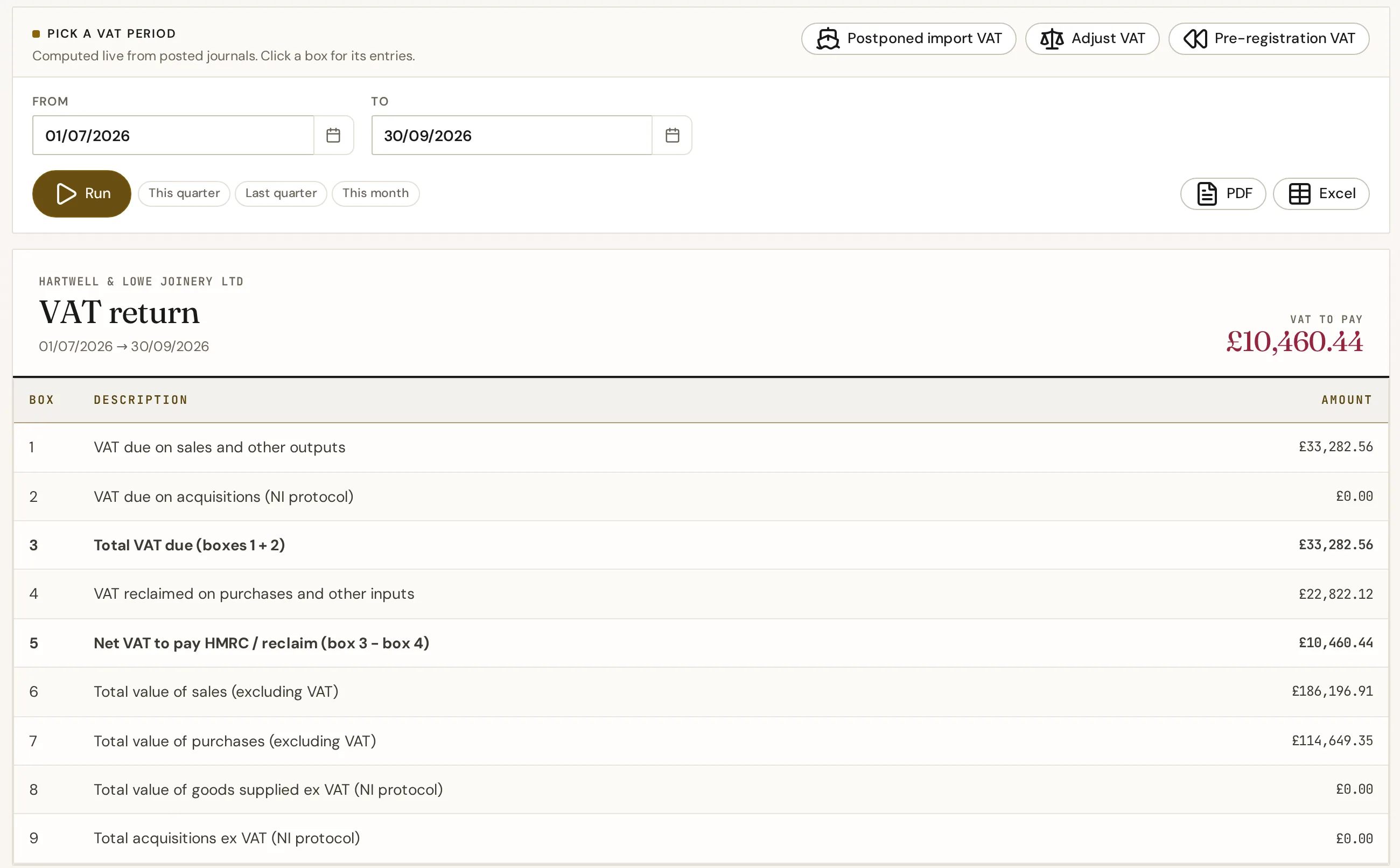
Your VAT return, built as you go
IQ Books doesn’t wait for the quarter to end. Every invoice, bill and bank line carries its VAT code from the moment it is recorded, so the nine boxes are always current. Open any box to see the transactions behind the figure, and export the return to PDF or Excel for your records.
- The nine-box return, computed live from the posted books
- Click any box to see the entries behind it
- A VAT adjustment for Box 1 and Box 4 corrections, balanced in the ledger
- Filed periods lock, so a return always ties back to its books
02
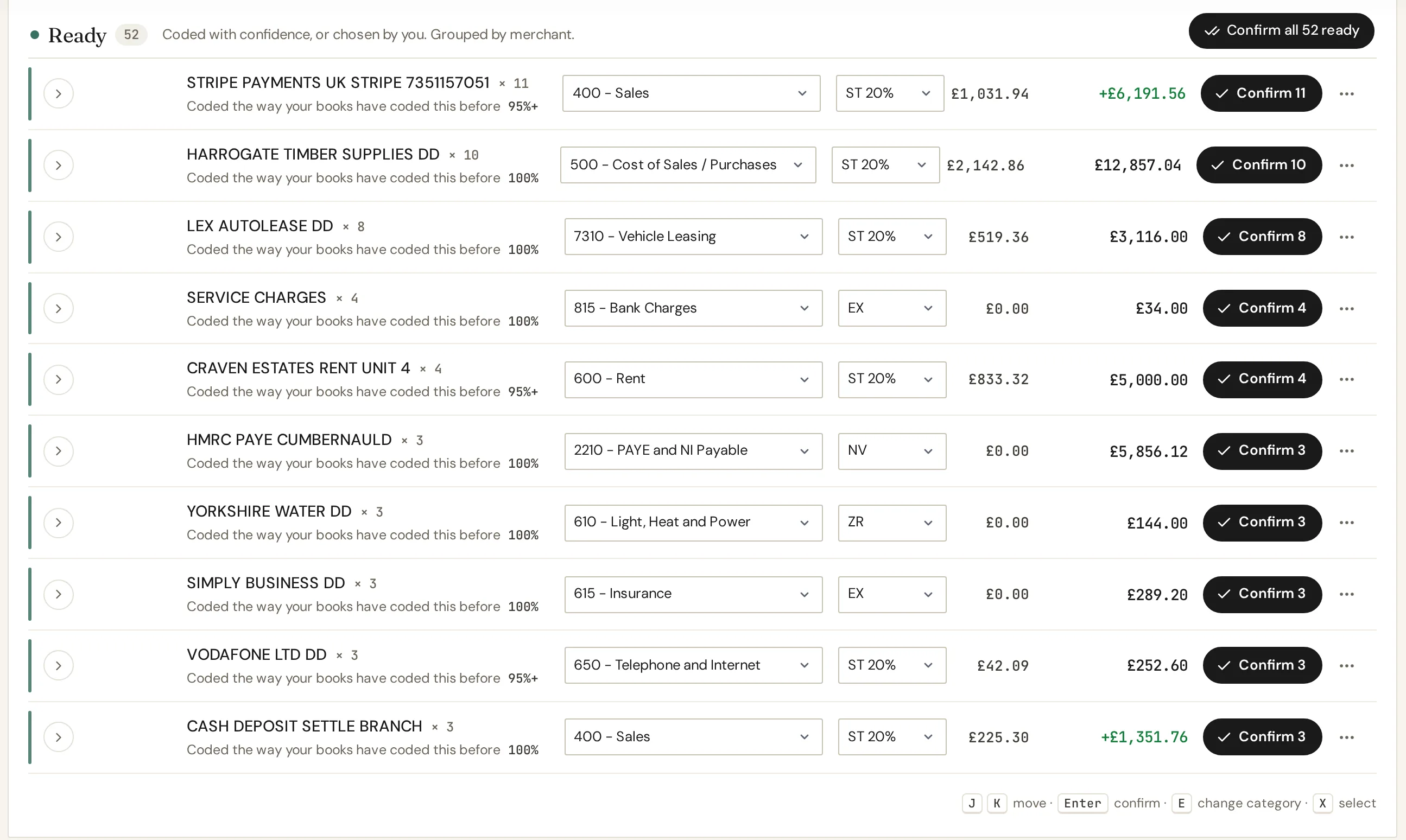
VAT on every bank line, coded on arrival
With open banking feeds, new bank lines arrive already coded by CodeIQ, the AI bookkeeper built into IQ Books: the account and the VAT code, grouped by merchant and ready for you to check and confirm in bulk. Coding by hand is always free; automatic coding draws on credits, and every account starts with 1,000.
- Ten VAT codes, including reverse charge, postponed import VAT and the domestic reverse charge
- Standard, zero-rated, exempt and outside-the-scope lines kept apart, so the right boxes fill
- Confidence shown on every coded group, and a whole batch confirmed at once
03
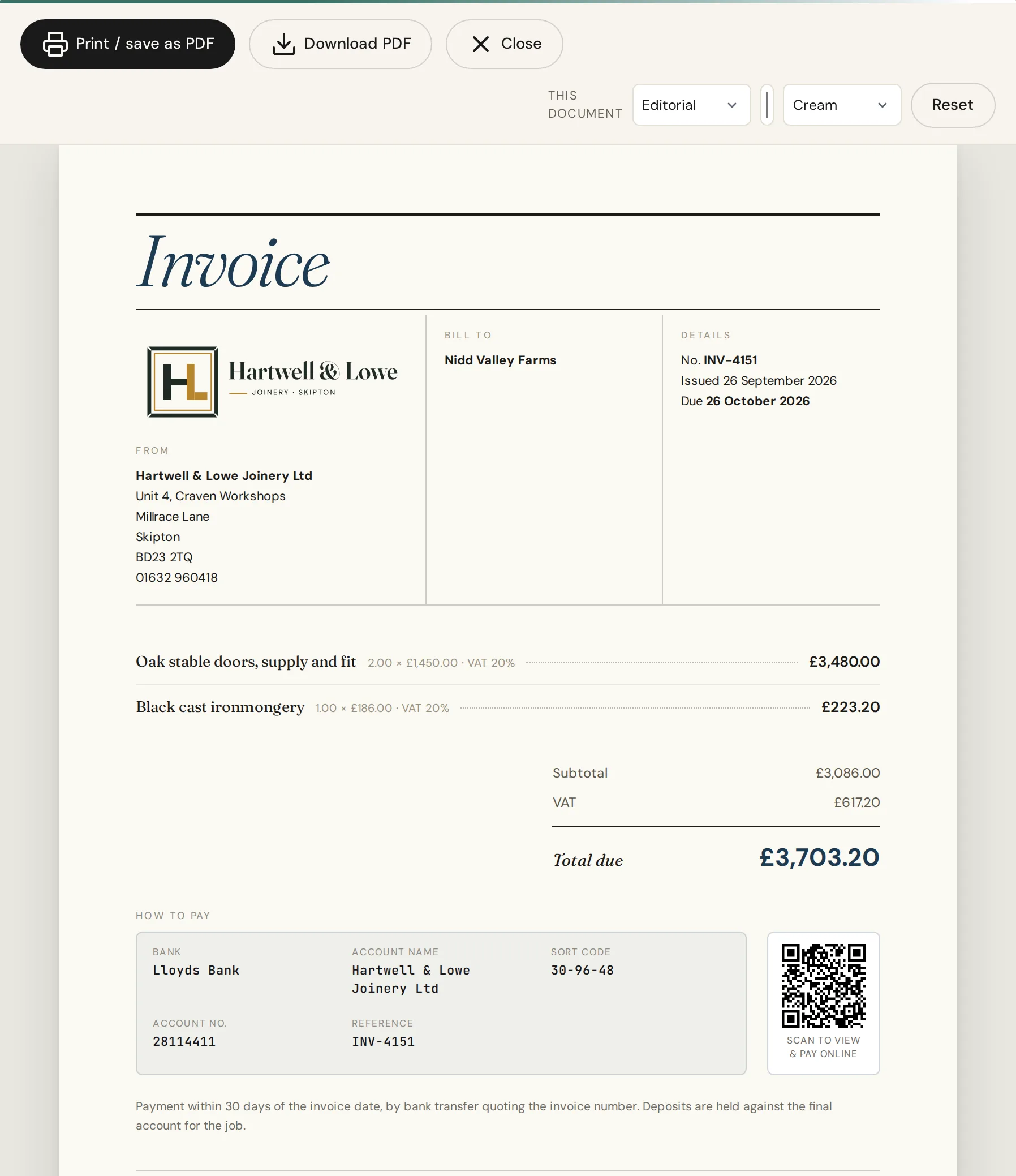
VAT invoices that show their working
Once you are VAT registered, every invoice and quote from IQ Books carries your VAT number, the rate on each line and a VAT breakdown, in whichever of the seven designs you choose. Each invoice also has its own pay page and a scan-to-pay QR code.
- Your VAT number, the rate on each line, and totals before and after VAT
- Seven designs, eight colours, white or cream paper
- A pay page and scan-to-pay QR code for every invoice
Try the designs on our free invoice template.
04
Filed to HMRC under Making Tax Digital
Connect IQ Books to HMRC once and it fetches your VAT obligations, shows which periods are open and due, and submits the return straight from the books, keeping HMRC’s receipt with it. Standard accounting, cash accounting and the Flat Rate Scheme are all supported.
- VAT filing is included on every plan, the free plan too
- HMRC approved IQ Books for live MTD filing in September 2026
- Standard, cash accounting and Flat Rate Scheme, including the 1% first-year rate
How it works for VAT and Income Tax: free MTD software.
Everything above, free
One organisation with the whole IQ Books ledger: VAT codes on every transaction, the live nine-box return, Making Tax Digital filing to HMRC, VAT invoices in seven designs, bank feeds and receipts. Typing and coding by hand is always free; automation such as coding bank lines and reading receipts draws on 1,000 free credits.
More automation, every month
Paid plans, from £5 a month, add monthly credits so bank lines keep coding themselves, plus emailing invoices and automatic payment reminders from the app.
Guide
Working VAT out by hand
VAT is one multiplication or one division. Here are the sums, the rounding rules, the three rates and when you have to register, all checked against GOV.UK.
The three sums behind every VAT figure
Whichever way round you start, VAT is one multiplication or one division. At the standard rate:
- Adding VAT: multiply the net price by 1.2. The VAT on its own is the net price × 0.2. £250 net becomes £300, of which £50 is VAT.
- Removing VAT: divide the VAT-inclusive price by 1.2. £300 ÷ 1.2 = £250 net.
- Finding the VAT inside a gross figure: take one sixth of it. HMRC calls this the VAT fraction: at 20% it is 20/120, which is 1/6. The VAT in £300 is £50.
At the 5% reduced rate the same sums use 1.05, and the VAT fraction is 5/105, or 1/21. At 0% there is no VAT to add or remove, but a zero-rated sale is still a taxable sale: it counts towards your turnover and is shown on a VAT invoice as 0%.
One mistake catches people out more than any other: taking 20% off a gross price. 20% of £120 is £24, which would leave £96. The right answer is £100, because the VAT was 20% of the net price, not of the gross. That is why removing VAT is a division by 1.2, not a 20% discount.
Rounding
This calculator rounds the VAT to the nearest penny and works the other figure out from it, so net plus VAT always equals gross. HMRC’s rules give invoice traders some room: you may round the total VAT on a VAT invoice down to the whole penny. If you work VAT out line by line, round each line either down to the nearest 0.1p or to the nearest 1p or 0.5p, and use the same method every time. Retailers using a retail scheme follow separate rules. Tick Round VAT down to the penny above to see the invoice-trader version.
Which rate applies to what you sell
| Rate | Applies to | Examples |
|---|---|---|
| 20% standard | Most goods and services | Most things a business sells, unless a reduced or zero rate or an exemption applies |
| 5% reduced | Some goods and services | Children’s car seats, home energy |
| 0% zero | Zero-rated goods and services | Most food, children’s clothes, books and newspapers |
Exempt is not the same as zero-rated. Exempt supplies, such as postage stamps and financial and property transactions, sit outside VAT altogether and do not count towards the registration threshold. Zero-rated supplies do count. HMRC’s rates of VAT on different goods and services lists the details item by item, and a lot of them turn on the exact wording.
When you must register
You must register for VAT if your VAT-taxable turnover for the last 12 months goes over £90,000, counted on a rolling basis rather than by tax year. You must also register if you expect to go over it in the next 30 days on their own. In the rolling 12-month case you have 30 days from the end of the month you went over, and your registration takes effect from the first day of the second month after it. If your taxable turnover later falls below £88,000, you can ask to cancel your registration. You can also register voluntarily below the threshold, which some businesses do to reclaim the VAT on their costs.
What a VAT invoice has to show
When a VAT-registered business sells standard-rated or reduced-rated goods or services to another VAT-registered business, it must issue a VAT invoice. HMRC’s list includes:
- a unique, sequential invoice number, the date of issue and the time of supply (tax point)
- your name, address and VAT registration number, and your customer’s name and address
- a description of each item, with its quantity, unit price, VAT rate and amount before VAT
- the total before VAT and the total VAT, which must be in sterling
For sales of £250 or less including VAT, you can issue a simplified VAT invoice if your customer agrees. Our free invoice template lays these fields out for you.
VAT returns under Making Tax Digital
Every VAT-registered business is now signed up for Making Tax Digital for VAT. That means keeping your VAT records digitally and submitting your VAT returns to HMRC through compatible software, rather than typing figures into HMRC’s website. If you are also a sole trader, Making Tax Digital for Income Tax is arriving too: our guide to Making Tax Digital for the self-employed covers both, and our MTD software page explains how IQ Books files them.
Rates and thresholds checked against GOV.UK on 5 October 2026: VAT rates, VAT thresholds, when to register, VAT guide (VAT Notice 700) paragraphs 7.3.1, 16.3 and 17.5, and Making Tax Digital for VAT. This calculator is a guide to the arithmetic, not tax advice.
Questions
VAT, answered
About UK VAT, this calculator, and what IQ Books does with your VAT.
How do I calculate VAT at 20%?
Multiply the price before VAT by 0.2 to get the VAT, or by 1.2 to get the price including VAT. A £100 net price carries £20 of VAT, so the customer pays £120.
How do I remove VAT from a price?
Divide the VAT-inclusive price by 1.2 at the standard rate, or by 1.05 at the reduced rate. The answer is the net price and the difference is the VAT. £120 divided by 1.2 is £100 net, so the VAT is £20.
Is the VAT fraction 1/6?
Yes, at the 20% standard rate. The VAT inside a VAT-inclusive price is 20/120 of it, which is one sixth, so the VAT in £120 is £20. At the 5% reduced rate the fraction is 5/105, or one twenty-first.
What are the UK VAT rates?
There are three. The standard rate of 20% covers most goods and services. The reduced rate of 5% covers some, such as children's car seats and home energy. The zero rate of 0% covers things like most food, children's clothes, books and newspapers. Some things are exempt from VAT altogether, such as postage stamps and financial and property transactions.
When do I have to register for VAT?
You must register if your VAT-taxable turnover for the last 12 months goes over £90,000, or if you expect it to go over £90,000 in the next 30 days alone. In the first case you have 30 days from the end of the month you went over. You can ask to cancel your registration if your taxable turnover falls below £88,000.
How should VAT be rounded?
This calculator rounds to the nearest penny. On a VAT invoice, HMRC lets invoice traders round the total VAT down to the whole penny. If you work VAT out line by line, round each line either down to the nearest 0.1p or to the nearest 1p or 0.5p, and use the same method every time (VAT Notice 700, paragraph 17.5). Retailers follow separate rules.
Does this calculator store or send my figures?
No. Every calculation runs in your browser. Nothing you type is sent to ReconcileIQ or anyone else, and nothing is saved when you close the page.
Can IQ Books do my VAT return?
Yes. IQ Books sets the VAT code on each sale, purchase and bank line as it is recorded, builds the nine-box return from your books as the quarter runs, and files it to HMRC under Making Tax Digital. You can open any box to see the transactions behind it, and once a period is filed it locks, so the return always ties back to the books.
Is VAT filing free in IQ Books?
Yes. Filing VAT returns under Making Tax Digital is included on every plan, the free one too, and HMRC approved IQ Books for live MTD filing in September 2026. Paid plans, from £5 a month, add monthly credits for automation such as coding bank lines, plus emailing invoices and reminders from the app.
Stop working VAT out one figure at a time.
IQ Books codes the VAT on every bank line, invoice and bill as it arrives, keeps the return current all quarter and files it under Making Tax Digital. One organisation with the whole ledger, MTD filing included, is free.