Free bank reconciliation template and statement
Fill in a bank reconciliation statement right here. On one side, the balance per bank statement with the outstanding lodgements added and the unpresented cheques taken off; on the other, the balance per cash book with the charges, interest and receipts it is missing. The two adjusted balances must agree, and the template shows the difference as you type. It opens with a worked UK example you can clear, and downloads as an Excel bank reconciliation template with live formulas, a CSV or a PDF.
Everything runs in your browser. Nothing you type is sent to us or saved.
Bank reconciliation
The difference between the two adjusted balances.
Reconcile from the statement itself. Bank Reconciler matches every line of any bank statement to your books and leaves only the items on this page.
Try Bank Reconciler freeThis free bank reconciliation template is a working aid for preparing a bank reconciliation statement. It adds up what you enter; it cannot see your bank account or your books, so the figures are only as good as the ones you type in.
Bank Reconciler by ReconcileIQ
The same reconciliation, done from the data
This template is the method on paper. Bank Reconciler does it from the statement: it reads the bank statement in any format, matches every line to your books, and leaves you with the short list a reconciliation statement is made of, the unpresented items, the missing charges and the errors.
01
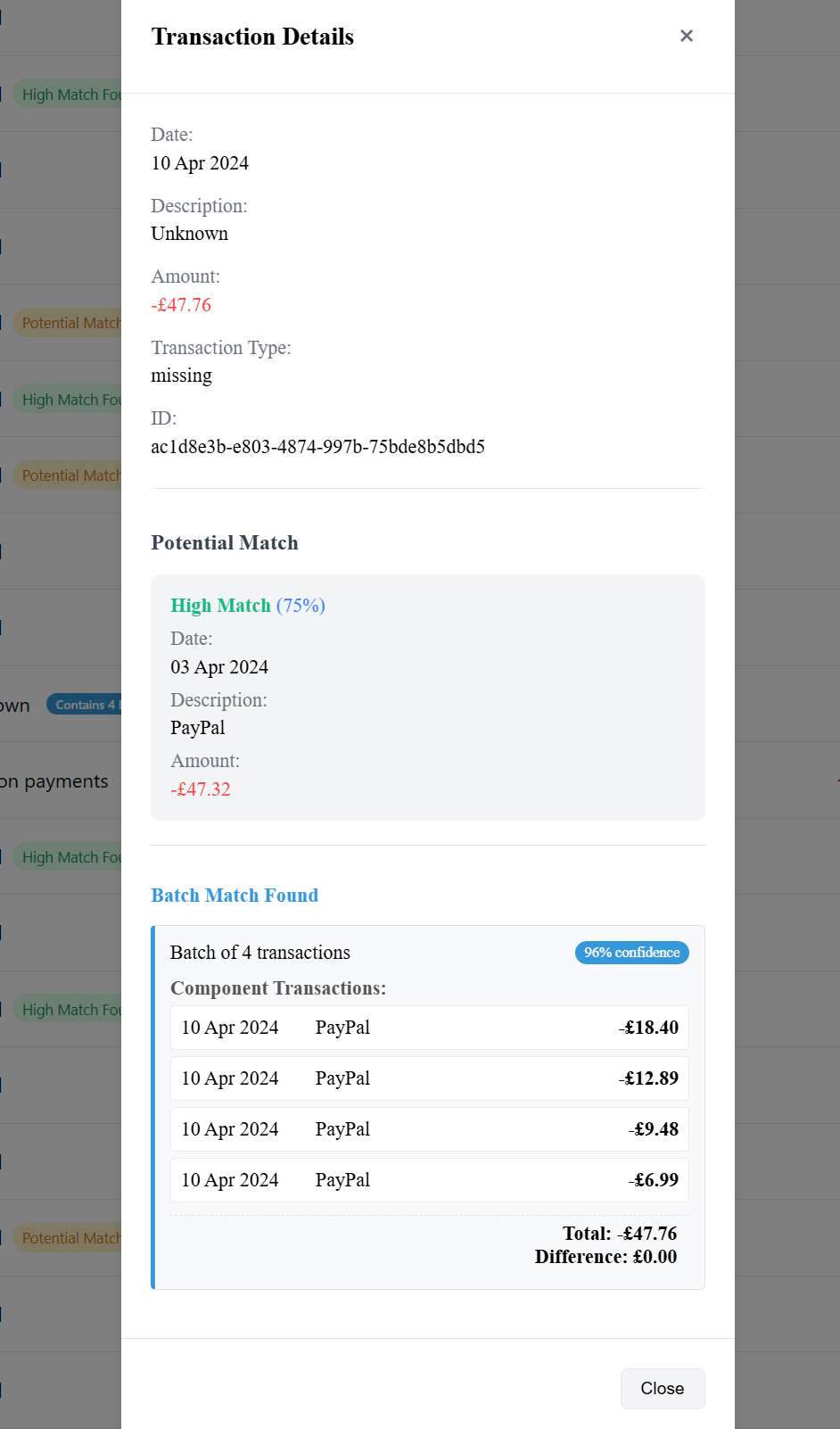
Every line matched, in seconds
Bank Reconciler compares the statement with the books from Xero, QuickBooks, Sage or Pandle at about 5,000 transactions a second. It finds the batch payments, where one bank line pays several invoices or one payment shows as several lines, copes with dates a few days apart and descriptions that don’t quite agree, and gives each match a confidence score.
- Matches the ones that tie, and shows its working on the ones that don’t
- Batch matches, many-to-one and one-to-many
- Date drift and fuzzy descriptions handled
02
Any statement, any bank
Drop in a CSV or Excel export from any bank, a digital PDF, a scanned statement or a phone photo of a paper one: the universal parser reads the dates, descriptions and amounts without a per-bank template. Or connect Xero, QuickBooks, Sage, Pandle, FreeAgent or YNAB and pull the books in directly.
- CSV, Excel, PDF, scans and photos
- No templates to set up per bank
- Direct connections to your accounting software
03
The fixes, pushed back
The cash book side of a reconciliation is a to-do list: charges, interest and direct debits the books have not recorded. Bank Reconciler turns those into proper entries and pushes them back to Xero, QuickBooks, Sage or Pandle in one click, so next month starts reconciled. A second method, included, matches invoices to the payments that settled them.
- Fixes posted back to your accounting software
- Invoice-to-payment reconciliation included
- Exports of the matched and unmatched items
04
Or keep the books in step every day
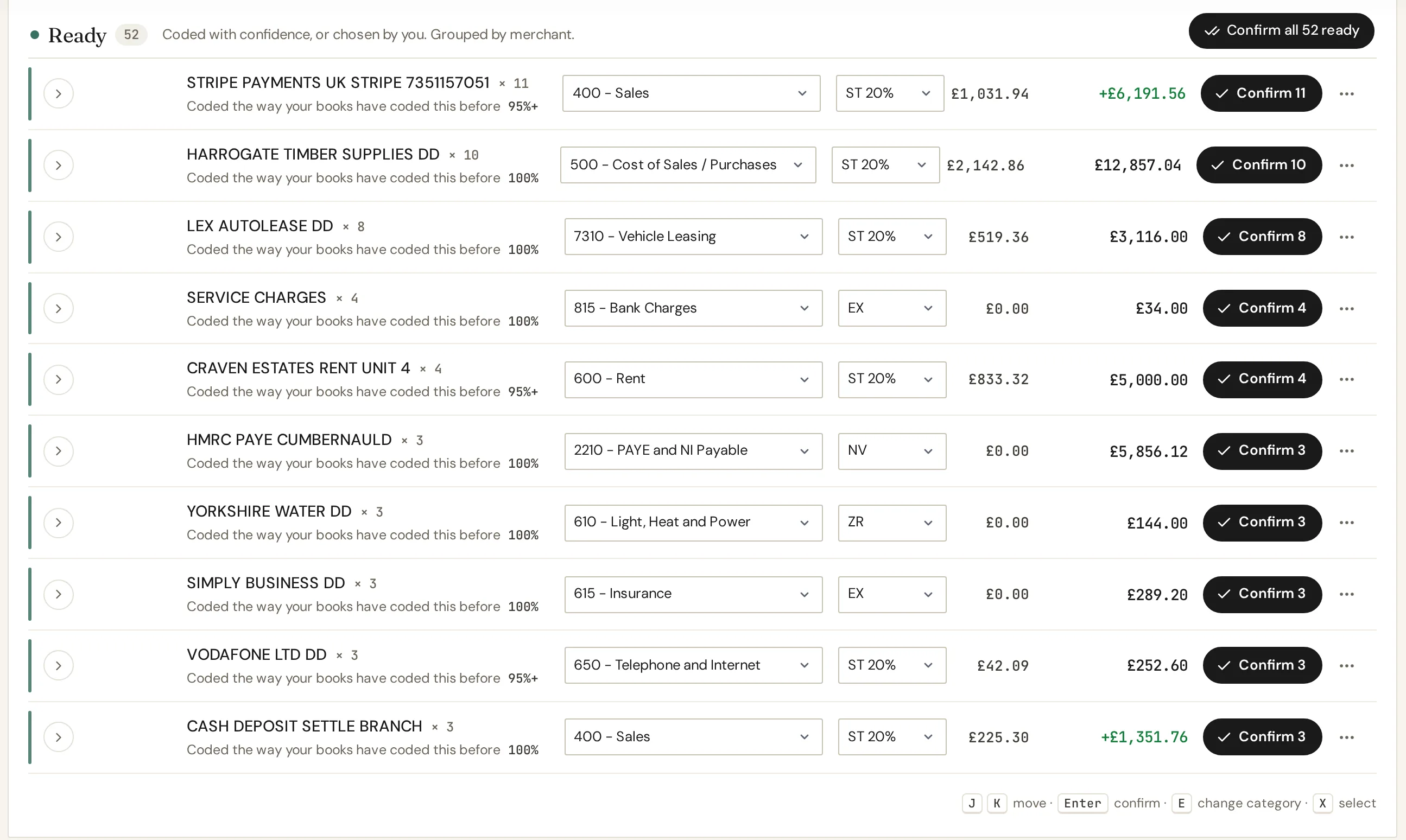
In IQ Books, the free accounting platform at the centre of ReconcileIQ, bank lines arrive already coded by CodeIQ with their account and VAT, and you confirm them, so the books follow the bank as you go rather than catching up at the month end.
- Bank lines coded on arrival, held for you if unsure
- The full ledger free for one organisation
- VAT returns filed from the books
See Bank Reconciler or IQ Books.
Included with every plan
Bank Reconciler is part of every ReconcileIQ plan, the free tier too. Every new account starts with 1,000 credits and a reconciled bank line uses one, so a small business can reconcile a month or more of its bank before paying anything.
Every month, every client
Paid plans, from £5 a month, add monthly credits for reconciliation along with CodeIQ, LedgerIQ and the full IQ Books ledger. Practices run it across every client’s bank.
Guide
How to do a bank reconciliation in the UK
The bank reconciliation statement format, a worked example, the UK terms, and what to check when it does not balance. For the long version, read our bank reconciliation guide.
What is a bank reconciliation statement?
A bank reconciliation statement explains why the balance on your bank statement and the balance of the bank account in your books, the cash book, are not the same on the same day, and proves that the gap is only timing and known items. Most of the gap is timing: cheques written but not yet cashed, money paid in on the last day of the month, a direct debit the bank has taken that you have not entered yet. Reconciling regularly is also how errors and fraud are caught early, and it is the check every accountant expects to see before a VAT return, a Making Tax Digital update or the year end.
How to do a bank reconciliation, step by step
If you are working out how to reconcile a bank statement, or how to make a bank reconciliation for the first time, the bank reconciliation process takes five steps, and the same procedures apply to any business account, savings account or credit card:
- Get the two balances for the same date. The closing balance on the bank statement, and the bank account balance in your cash book or accounting software.
- Tick off what agrees. Go down the statement and the cash book together and tick every receipt and payment that appears in both, for the same amount.
- List what is left on the bank side. Lodgements in your books that are not on the statement are outstanding lodgements; payments in your books that are not on the statement are unpresented.
- List what is left on the cash book side. Charges, interest, direct debits, standing orders and receipts that are on the statement but not in your books, and any errors you find.
- Adjust both balances and compare. When the adjusted bank balance equals the adjusted cash book balance, the account is reconciled. Then post the cash book items to your books.
That is the whole of the five-step reconciliation process. The template above does steps 3 to 5 with you; steps 1 and 2 are the bank statement and your records side by side. Reconcile the bank statement every month in the same order and it rarely takes more than a few minutes.
The bank reconciliation statement format
The bank reconciliation statement layout used in the UK, and in the template, adjusts both balances to the same true figure:
Balance per bank statement
+ outstanding lodgements
− unpresented cheques and payments
= adjusted bank balance
Balance per cash book
+ receipts on the statement not yet in the cash book
− payments on the statement not yet in the cash book
± corrections
= adjusted cash book balance
The form at the top of this page and the Excel template follow this bank reconciliation format line for line, so a filled one doubles as a sample format to keep with your records. Some textbooks start from the cash book and work towards the bank balance in one column instead. The arithmetic is the same; the two-sided layout makes it clearer which items need posting to your books (the cash book side) and which will clear on their own (the bank side).
A worked bank reconciliation example
Harbour Florists Ltd, an illustrative business, reconciles its account at 31 March. The bank statement shows £8,412.50 and the cash book shows £8,742.30.
| The bank side | £ |
|---|---|
| Balance per bank statement | 8,412.50 |
| Add: card takings paid in on 31 March | 1,240.00 |
| Add: a customer’s cheque paid in on 31 March | 385.00 |
| Less: cheque 000412 to the flower wholesaler | (960.00) |
| Less: cheque 000413 for a van repair | (214.80) |
| Adjusted bank balance | 8,862.70 |
| The cash book side | £ |
|---|---|
| Balance per cash book | 8,742.30 |
| Add: bank interest for March | 4.30 |
| Add: a customer’s BACS payment not yet recorded | 180.00 |
| Add: a supplier payment of £327.90 entered as £372.90 | 45.00 |
| Less: bank charges | (18.50) |
| Less: direct debit for the card terminal | (29.00) |
| Less: standing order for the shop insurance | (61.40) |
| Adjusted cash book balance | 8,862.70 |
Both sides come to £8,862.70, so the account is reconciled. The two cheques and the two lodgements will clear in April by themselves. The six items on the cash book side are posted to the books now, and the £45.00 is a real error: the payment was keyed with two digits swapped. That example is loaded in the template above, so you can change any figure and watch the difference move.
Unpresented cheques and outstanding lodgements
These are the two timing differences on the bank side. Unpresented cheques, sometimes called uncleared cheques, are cheques you have written and recorded that the payee has not paid in yet, or that the bank has not cleared; the same goes for any payment you have recorded that has not left the account by the statement date. Outstanding lodgements are amounts you have paid in, or recorded as received, that have not reached the statement yet, typically takings banked on the last day. Both should clear within days. An outstanding lodgement still missing after a few days needs chasing with the bank, and an unpresented cheque more than six months old is usually stale and may need cancelling in the books.
| UK term | US term | Which side |
|---|---|---|
| Unpresented cheques | Outstanding checks | Bank side, deducted |
| Outstanding lodgements | Deposits in transit | Bank side, added |
| Cash book | Book balance, the cash account in the general ledger | The starting point of the second half |
| Bank charges | Bank service charges, fees | Cash book side, deducted |
| Direct debits and standing orders | Automatic payments, ACH debits | Cash book side, deducted |
| BACS receipts | ACH credits, direct deposits | Cash book side, added |
Why your bank reconciliation does not balance
- An item on the wrong side. Adding an item that should be deducted makes the difference exactly twice that item.
- A transposition. Two digits swapped, £54.00 keyed as £45.00, makes a difference that divides exactly by nine.
- A missing line. A charge, interest payment or direct debit on the statement that is not on your list; the difference equals it.
- An item counted twice, on both sides or twice on one side.
- The wrong starting balances. The bank figure must be the closing balance at the statement date, and the cash book figure your balance at the same date before these adjustments.
- Last month did not balance either. An old difference carries forward; reconcile the earlier month first.
- A bank error. Rare, but it happens: a payment taken twice or a lodgement credited to the wrong account. Raise it with the bank and show it on the bank side until it is corrected.
When the difference is not zero, the template above runs the first three tests on your figures and tells you which item to look at.
How to do a bank reconciliation in Excel
The free Excel bank reconciliation template (an .xlsx file; Excel opens it exactly as it would an .xls bank reconciliation template) is laid out in the same order as the statement, with these formulas already in place:
Adjusted bank balance = bank balance + SUM(outstanding lodgements) − SUM(unpresented payments)
Adjusted cash book balance = cash book balance + SUM(receipts) − SUM(payments) + SUM(corrections)
Difference = adjusted bank balance − adjusted cash book balance
It is a simple bank reconciliation template, a one-page bank reconciliation worksheet you can reuse every month: fill in the shaded cells and the difference cell shows 0.00 and the word Reconciled when it agrees. The file works in Excel, Google Sheets, Numbers and LibreOffice. If you fill the statement on this page instead, the Excel download carries the same live formulas, so you can keep using it as next month’s template.
Supplier statement reconciliation
Supplier reconciliation uses the same method. To reconcile supplier statements, agree each supplier’s statement to your purchase ledger: start from the balance the supplier says you owe, take off invoices on their statement that are not in your ledger yet and payments you have made that they have not received, add any credit notes you have recorded that they have not, and compare with the balance in your ledger. Download the supplier statement reconciliation template for Excel.
How often to reconcile
Monthly is the minimum, when the statement arrives, and always before a VAT return, a Making Tax Digital quarterly update or the year end. A difference is easy to find a few weeks after it happens and much harder a year later. With a bank feed and software doing the matching, many businesses reconcile weekly or even daily, and the month-end reconciliation becomes a check rather than a job.
Questions
Bank reconciliation, answered
About the bank reconciliation statement, the template, and what Bank Reconciler does for you.
What is a bank reconciliation statement?
A bank reconciliation statement explains the difference between the balance on your bank statement and the balance of the bank account in your own books, the cash book, at the same date. It starts from the bank balance, adds money you have paid in that the bank has not shown yet (outstanding lodgements) and takes off payments that have not cleared (unpresented cheques), and does the same for the items the bank has recorded that your books have not. When both adjusted balances agree, the account is reconciled.
How do I do a bank reconciliation, step by step?
Take the closing balance from the bank statement and the bank account balance from your cash book for the same date. Tick off every item that appears in both. List what is left: lodgements and payments in your books that the bank has not processed yet go on the bank side; charges, interest, direct debits and receipts on the statement that you have not recorded go on the cash book side, along with any errors. Adjust both balances and check they agree. Then post the cash book items to your books so next month starts clean.
How do I format a bank reconciliation statement?
The common UK format has two parts. First the bank side: balance per bank statement, add outstanding lodgements, less unpresented cheques and payments, equals the adjusted bank balance. Then the cash book side: balance per cash book, add receipts on the statement not yet in the cash book, less payments on the statement not yet in the cash book, plus or minus any corrections, equals the adjusted cash book balance. The two adjusted balances must be the same figure. The template on this page lays it out exactly that way.
Can I download a free bank reconciliation template in Excel?
Yes. Download the blank bank reconciliation template for Excel, which has the formulas built in, or fill the statement on this page and download it as an Excel file, a CSV or a PDF. The Excel downloads open in Excel, Google Sheets, Numbers and LibreOffice, and nothing you type here is sent to us.
How do I do a bank reconciliation in Excel?
Put the balance per bank statement in one cell, list outstanding lodgements and unpresented payments underneath, and calculate the adjusted bank balance as the bank balance plus the sum of the lodgements minus the sum of the unpresented items. Do the same for the cash book: its balance, plus receipts and less payments that are on the statement but not in the books, plus corrections. A final cell takes one adjusted balance from the other; it should show zero. The free Excel template already has these formulas.
What are unpresented cheques and outstanding lodgements?
Unpresented cheques are cheques and payments you have recorded in your cash book that have not yet been taken from your account by the bank, often because the cheque has not been paid in or a payment was made on the last day of the month. Outstanding lodgements are the opposite: money you have paid in, or recorded as received, that has not reached the bank statement yet. Both are timing differences that clear on their own, usually within days. In US terms they are outstanding checks and deposits in transit.
What do I do with bank charges and interest that are not in my books?
They go on the cash book side of the reconciliation, because the bank is right and your books are behind: bank charges, direct debits and standing orders are deducted from the cash book balance, and interest and receipts you had not recorded are added. Then post them to your books as real entries, so the same items do not reappear next month.
Why doesn't my bank reconciliation balance?
The usual causes, in the order worth checking: an item on the wrong side, which makes the difference exactly twice that item; a figure with two digits swapped, which makes the difference divisible by nine; a line on the bank statement you have not listed; an item listed twice; a starting balance from the wrong date; or last month's reconciliation not having balanced either. The template on this page runs these checks for you when the difference is not zero.
How often should I reconcile my bank account?
At least monthly, when the statement arrives, and always before a VAT return, a Making Tax Digital quarterly update or the year end. Small differences are easy to find a few weeks after they happen and hard to find a year later. Many businesses with a bank feed reconcile weekly, or daily, because the matching is mostly done for them.
What is the difference between the cash book and the bank statement?
The bank statement is the bank's record of your account. The cash book is your own record of the same account, kept in your accounting software or a spreadsheet: every receipt and payment as you record it. They differ because of timing (items one side has recorded and the other has not yet) and errors on either side, which is exactly what a bank reconciliation explains.
What is a supplier statement reconciliation?
It is the same idea for a supplier: you agree the balance on the statement a supplier sends you to the balance in your purchase ledger, explaining the difference with invoices you have not posted yet, payments that have not reached them and credit notes one side has not recorded. Download the supplier statement reconciliation template for Excel.
Can software do my bank reconciliation for me?
Yes. Bank Reconciler by ReconcileIQ reads a bank statement in any format, a CSV or Excel export, a digital PDF, a scan or a phone photo, matches every line to the books from Xero, QuickBooks, Sage or Pandle at about 5,000 lines a second, and leaves you with the short list a reconciliation statement is made of. It pushes the fixes back to your accounting software, and it is included with every ReconcileIQ plan, the free tier too.
Stop reconciling line by line.
Bank Reconciler reads any bank statement, matches every line to your books from Xero, QuickBooks, Sage or Pandle, and pushes the fixes back. It is included with every plan, the free tier too.