by
Free tool · Margin and markupBy ReconcileIQ

Profit margin calculator: gross margin, net margin and markup

Enter any two of cost, selling price, margin and markup, and this margin calculator works out the other two, with the working shown. Use it as a gross margin calculator, or as a markup calculator to price from your cost, or switch to net margin to go from a profit and loss to your gross, operating and net margin. Prices that include VAT are handled too.

Every sum runs in your browser. Nothing you type is sent to us or saved.

What do you want to work out?

Fill in any two. The calculator keeps the two figures you typed last and works out the other two, marked worked out.

The margin is worked on the price before VAT: the VAT you charge goes to HMRC, so it is not part of your profit.

Result Margin and markup
Gross margin
40%
£40.00 profit on a £100.00 selling price.
Selling price before VAT
£100.00
Cost
£60.00
Profit
£40.00
Margin
40%
Markup
66.67%

Profit = £100.00 − £60.00 = £40.00. Margin = £40.00 ÷ £100.00 = 40%. Markup = £40.00 ÷ £60.00 = 66.67%.

Money rounded to the penny and percentages to two decimal places. Runs in your browser; nothing is sent or saved.

Every month, every product line, not one sum. LedgerIQ reads gross, operating and net margin from your general ledger and shows the trend.

See how

LedgerIQ by ReconcileIQ

Your real margins, from the ledger

This calculator does one product at a time. LedgerIQ reads a whole general ledger, from Xero, QuickBooks, Sage, Pandle or any other platform, or live from IQ Books, and works your margins out for every month: gross, operating, net, contribution and EBITDA.

01

Margin analysis, month by month

Upload a general ledger export and LedgerIQ classifies the accounts, builds the profit and loss and works out each margin for every month in the period, with the trend line and a comparison against your industry. RiQ, the assistant built into it, explains what moved and why, in plain English.

  • Gross, operating, net, contribution and EBITDA margin
  • Every month in the period, with the direction of travel
  • A comparison with businesses in your industry
  • One of 44 analysis modules from the same upload
1,000 free credits to start
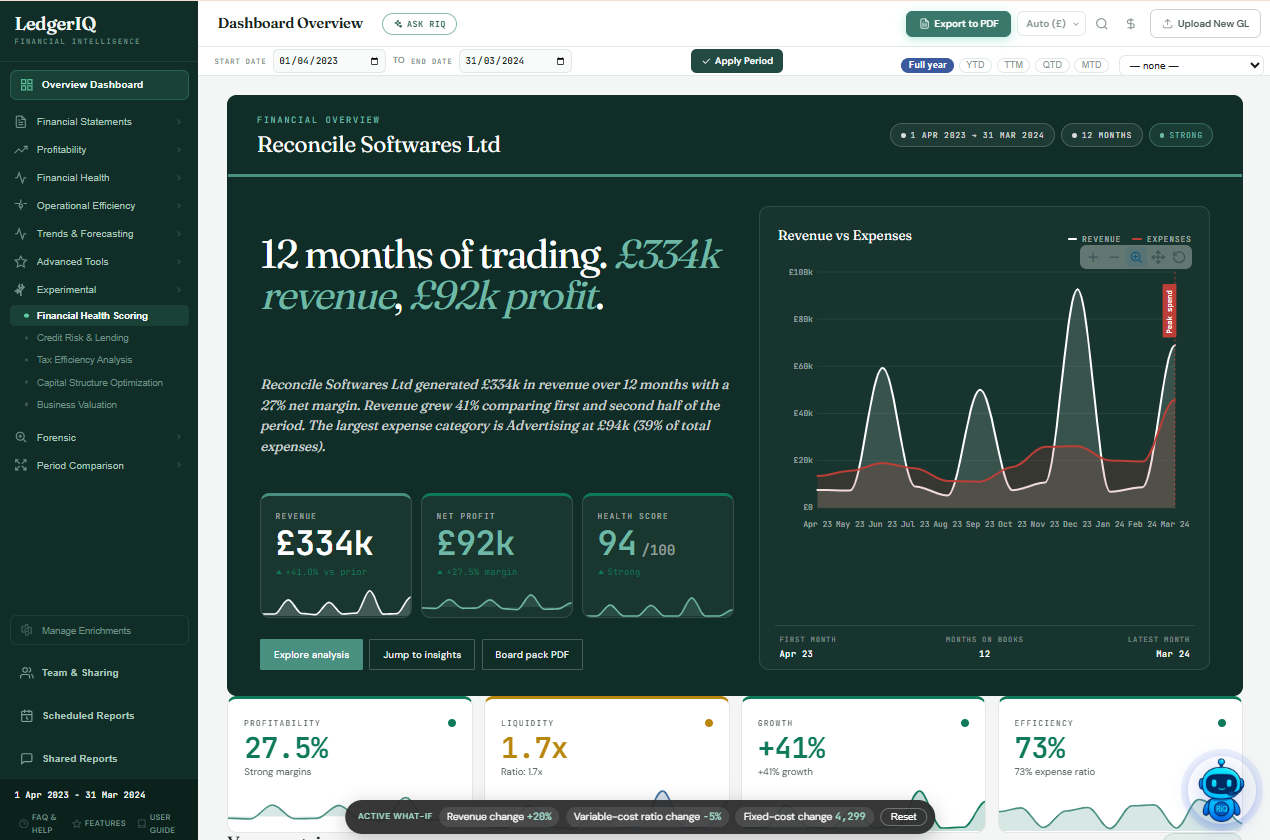
LedgerIQ · Dashboard overview
The LedgerIQ dashboard for 12 months of trading: £1.6m revenue, £140k profit, a 9.0% net margin tile, liquidity, growth and cost discipline

02

Which lines carry the margin

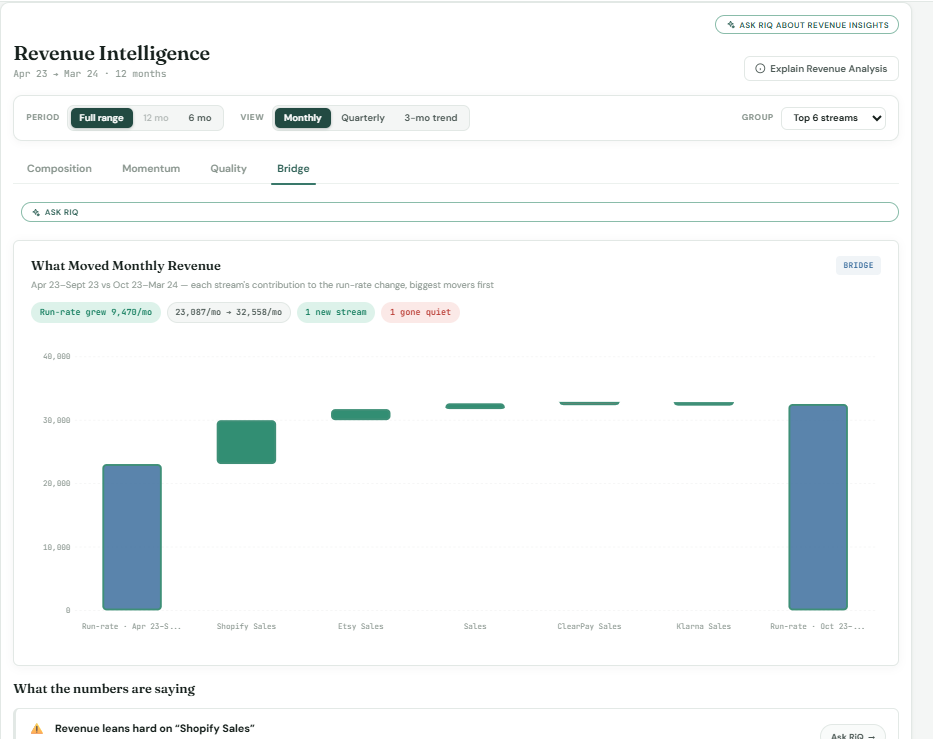
Revenue insights splits sales by line, so you can see which streams grew and which went quiet. On IQ Books ledgers, where each sales line carries the cost of the stock it used, LedgerIQ also gives the margin of each product and says plainly how much of your sales those lines cover, rather than guessing the rest.

  • What moved monthly revenue, stream by stream
  • Margin by product on IQ Books ledgers
  • Lines with no stock cost left out, never estimated
LedgerIQ · Revenue insights
LedgerIQ revenue insights: the change in monthly run-rate broken down by sales line, with the lines that grew and the ones that fell

03

What the margin is worth to you

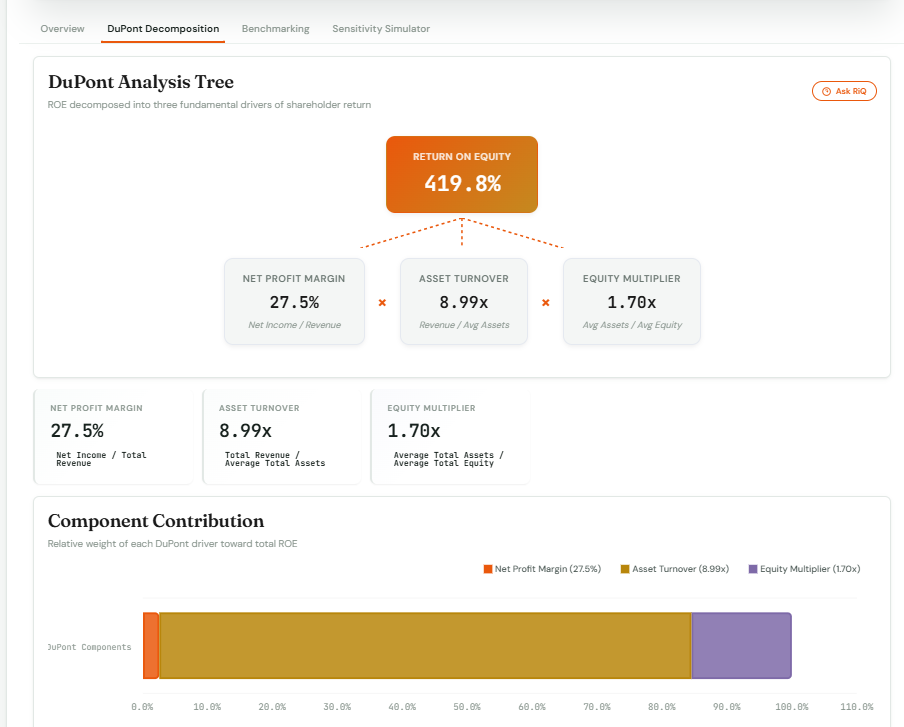
Net margin is one of three drivers of return on equity. LedgerIQ’s DuPont analysis splits your return into net profit margin, asset turnover and leverage, so you can see whether a better return needs a better margin or a busier balance sheet.

  • Return on equity broken into its three drivers
  • Each driver traced back to the figures in the ledger
  • Break-even and what-if pricing in the same analysis

More about LedgerIQ financial analysis.

LedgerIQ · DuPont analysis
LedgerIQ DuPont analysis tree: return on equity of 29.5% from a 9.0% net profit margin, 1.67 times asset turnover and a 1.97 times equity multiplier

04

Gross profit in your books, every day

If you keep your books in IQ Books, the profit and loss is always current: sales, cost of sales and gross profit, then overheads, operating profit and net profit, for any period you choose. Click any line to see the transactions behind it.

  • Gross, operating and net profit from the posted books
  • Every line opens to its transactions
  • The whole ledger on the free plan
Free plan
Profit and loss
Example figures · 12 months
From the books
Sales£250,000.00
Cost of sales£150,000.00
Gross profit · 40% margin£100,000.00
Overheads£70,000.00
Operating profit · 12% margin£30,000.00
Free to start

Your first analysis, on us

A full LedgerIQ analysis draws 1,000 credits, and every new account starts with 1,000 free credits. IQ Books itself is free for one organisation with the whole ledger, profit and loss included.

Paid plans

Analysis every month

Paid plans, from £5 a month, add monthly credits for LedgerIQ analyses and the rest of the ReconcileIQ automation, such as coding bank lines.

See pricing

Guide

How to calculate profit margin

Margin and markup are two ways of looking at the same profit. Here are the formulas, the conversions between them, the Excel versions and how VAT fits in.

How to calculate profit margin percentage

Profit margin is the share of each pound of sales you keep as profit. To get the percentage, divide the profit by the selling price and multiply by 100:

Margin = (selling price − cost) ÷ selling price × 100

A product that costs £60 and sells for £100 makes £40 of profit, and £40 ÷ £100 is a 40% margin. Because margin is a share of the price, it can never reach 100% unless the cost is zero, and a sale below cost gives a negative margin.

Gross profit margin formula

Gross margin means the share of revenue left after the cost of sales. Here is how to calculate gross profit margin for the whole business, using the profit and loss:

Gross margin = (revenue − cost of sales) ÷ revenue × 100

Cost of sales is what it cost to make or buy what you sold: stock, materials, subcontractors and direct labour. Rent, office wages, insurance and software are overheads and sit below the gross profit line. Gross profit is the amount in pounds; gross margin is that amount as a percentage of revenue. £100,000 of gross profit on £250,000 of sales is a 40% gross margin.

Net profit margin and operating margin

Take the overheads off gross profit and you have operating profit; take off interest and tax as well and you have net profit. Net profit margin is what is left of each pound of sales after every cost. Here is how to calculate net profit margin, and operating margin: divide that profit by revenue.

  • Operating profit margin formula: operating profit ÷ revenue. £30,000 on £250,000 is 12%.
  • Net profit margin formula: net profit ÷ revenue. £22,400 on £250,000 is 8.96%.

Gross vs net profit margin, then: gross margin counts only the cost of sales, so it shows how well you price and buy; net margin counts every cost, so it shows what the business actually keeps.

UK accounts show profit both before and after tax, so when you quote a net profit margin, say which one you mean. A sole trader’s accounts usually show profit before tax, because income tax is paid personally.

How to calculate markup

Markup means the amount you add to the cost to reach the selling price, shown as a percentage of the cost. The markup formula is:

Markup = (selling price − cost) ÷ cost × 100

To price from a markup, multiply the cost by one plus the markup. A 20% markup on a £50 cost is £50 × 1.2 = £60; a 70% markup is £50 × 1.7 = £85. Wholesalers and trades often price this way, as a markup on cost, then quote the margin to compare with the rest of the business.

A selling price from a target margin

If you know the margin you want, divide the cost by one minus that margin:

Price = cost ÷ (1 − margin)

A 40% margin on a £60 cost is £60 ÷ 0.6 = £100. The common mistake is to add 40% to the cost instead: that gives £84, which is a 40% markup but only a 28.57% margin.

Profit margin formula in Excel

With the cost in A2 and the selling price in B2:

  • Margin: =(B2-A2)/B2, formatted as a percentage
  • Markup: =(B2-A2)/A2, formatted as a percentage
  • Price from a margin in C2: =A2/(1-C2)
  • Price from a markup in C2: =A2*(1+C2)

The same formulas work in Google Sheets. Enter percentages as 40% or 0.4, not 40.

Profit margin and VAT

If you are VAT registered, work your margin on prices before VAT. The VAT you charge on a sale is collected for HMRC, and you reclaim the VAT on your costs, so neither is part of your profit. Tick Selling price includes VAT and the calculator divides your price by 1.2 at the standard rate, or 1.05 at the reduced rate, before working the margin. If you are not VAT registered, you charge no VAT on sales, and any VAT you pay on costs is simply part of the cost. Our VAT calculator adds or removes VAT on its own.

The VAT margin scheme is something else

HMRC’s margin schemes are a way of charging VAT on second-hand goods, works of art, antiques and collectors’ items. Instead of VAT on the full selling price, you pay VAT at 16.67%, one-sixth, on the difference between what you paid and what you sold for: buy at £1,500, sell at £2,000, and the VAT is £83.33. You cannot use a margin scheme for anything you were charged VAT on when you bought it. It is a VAT rule, not a measure of profit, and this calculator does not apply it.

What is a good profit margin?

There is no single answer, and we would rather not invent one. Margins differ widely between trades, and between businesses in the same trade. A better test is whether your gross margin pays for your overheads, finance costs and tax and leaves a profit you are happy with. Track your own margin month by month, compare it with your previous years, and ask your trade body or accountant for figures from businesses like yours. A high margin is not too much if customers still buy; a falling one is worth a look whatever the level.

VAT figures checked against GOV.UK on 9 October 2026: VAT rates and VAT margin schemes. This calculator is a guide to the arithmetic, not financial or tax advice.
Conversions

Margin vs markup, side by side

The same sale, measured two ways. Markup is always the higher of the two, and the gap widens as the margin grows.

Markup = margin ÷ (1 − margin) and Margin = markup ÷ (1 + markup)

MarginMarkupOn a £100 selling price
10%11.11%Cost £90, price £100
20%25%Cost £80, price £100
25%33.33%Cost £75, price £100
30%42.86%Cost £70, price £100
33.33%50%Cost £66.67, price £100
40%66.67%Cost £60, price £100
50%100%Cost £50, price £100
60%150%Cost £40, price £100
70%233.33%Cost £30, price £100

Read it the other way for markup to margin: a 20% markup is a 16.67% margin, a 50% markup is 33.33%, a 70% markup is 41.18% and a 100% markup, doubling the cost, is a 50% margin. A 33% margin, rather than a third, is a 49.25% markup.

What is a 30% margin on £100? It depends which figure is £100. If it is the selling price, a 30% margin is £30 of profit and the cost is £70. If it is the cost, the price for a 30% margin is £100 ÷ 0.7 = £142.86.

Worked examples

Two UK businesses, priced properly

Both are VAT registered, so the margin is worked on the price before VAT. Type the same figures into the calculator above to follow along.

A florist · margin from a VAT-inclusive price

A £45 bouquet

The flowers, sundries and wrap for a hand-tied bouquet cost £18 before VAT. The shop sells it for £45 including VAT at 20%.

Price including VAT£45.00
VAT (£45.00 ÷ 1.2, the rest is VAT)£7.50
Price before VAT£37.50
Cost£18.00
Profit£19.50
Margin (£19.50 ÷ £37.50)52%
Markup (£19.50 ÷ £18.00)108.33%

Work the margin on the £45 instead and you would think it was 60%, a flattering figure that includes HMRC’s £7.50.

A joinery firm · price from a target margin

A fitted wardrobe

Materials come to £1,200 and the labour to £800, so the job costs £2,000. The firm wants a 35% margin on its work.

Cost of the job£2,000.00
Price before VAT (£2,000 ÷ 0.65)£3,076.92
VAT at 20%£615.38
Quote including VAT£3,692.30
Profit£1,076.92
Markup on cost53.85%

Adding 35% to the cost would have quoted £2,700 before VAT: a 35% markup, but a 25.93% margin, and £376.92 less profit on one job.

Questions

Margin and markup, answered

About working out profit margin, markup and VAT, this calculator, and what LedgerIQ does with your margins.

How do you calculate profit margin?

To work out profit margin, take the profit, divide it by the selling price and multiply by 100. Profit is the selling price minus the cost. Selling something for £100 that cost you £60 leaves £40 of profit, and £40 divided by £100 is a 40% profit margin. Margin is always a share of the selling price, never of the cost.

What is profit margin?

Profit margin is the share of your sales you keep as profit, shown as a percentage. A 25% profit margin means 25p of every £1 of sales is profit and 75p went on costs. Gross margin counts only the cost of sales; net margin counts every cost, overheads, interest and tax included.

What is the gross profit margin formula?

Gross profit margin = (revenue minus cost of sales) divided by revenue, times 100. Cost of sales is what it cost to make or buy what you sold: stock, materials and direct labour, but not overheads such as rent. £250,000 of sales and £150,000 of cost of sales is £100,000 of gross profit, a 40% gross margin.

What is net profit margin?

Net profit margin is net profit as a percentage of revenue: net profit divided by revenue, times 100. Net profit is what is left after cost of sales, overheads, interest and, if you show it after tax, tax. On £250,000 of sales, a net profit of £22,400 is a net margin of 8.96%. UK accounts show profit before and after tax, so say which one you mean.

What is the difference between margin and markup?

Both compare profit with something else. Margin compares it with the selling price; markup compares it with the cost. £40 of profit on a £60 cost and a £100 price is a 40% margin and a 66.67% markup. The same sale always has a higher markup than margin, and a margin can never reach 100% while the cost is above zero.

How do I calculate markup?

Markup = (selling price minus cost) divided by cost, times 100. To price from a markup, multiply the cost by 1 plus the markup: a 20% markup on £50 is £50 × 1.2 = £60, and a 70% markup is £50 × 1.7 = £85. A 20% markup is a 16.67% margin, and a 70% markup is a 41.18% margin.

What is a 30% margin on £100?

It depends which figure is £100. If £100 is the selling price, a 30% margin is £30 of profit and a £70 cost. If £100 is the cost, the selling price for a 30% margin is £100 divided by 0.7, which is £142.86, leaving £42.86 of profit.

How do I convert a margin to a markup?

Markup = margin divided by (1 minus the margin). A 33% margin is 0.33 ÷ 0.67 = a 49.25% markup, and a 40% margin is a 66.67% markup. Going the other way, margin = markup divided by (1 plus the markup), so a 50% markup is a 33.33% margin. The table on this page lists the common ones.

How do I work out a selling price from a margin?

Divide the cost by 1 minus the margin. For a 35% margin on a £2,000 cost, the price is £2,000 ÷ 0.65 = £3,076.92 before VAT. Adding 35% to the cost instead would give £2,700, which is a 35% markup but only a 25.93% margin.

Should I include VAT when I work out my margin?

If you are VAT registered, no: work your margin on prices before VAT, because the VAT you charge is not yours and goes to HMRC, and you reclaim the VAT on your costs. Tick Prices include VAT and the calculator takes it out for you. If you are not VAT registered, you charge no VAT, and the VAT you pay on costs is part of your cost.

What is a good profit margin?

There is no single figure, because margins vary widely between trades and between businesses in the same trade. What matters is whether your gross margin covers your overheads, finance costs and tax with something left over. Compare your margin with your own previous months and years, and with figures for businesses like yours from your trade body or your accountant.

How do I calculate profit margin in Excel?

With the cost in A2 and the selling price in B2, the margin is =(B2-A2)/B2 and the markup is =(B2-A2)/A2; format both cells as percentages. To price from a margin in C2, use =A2/(1-C2), and to price from a markup in C2, use =A2*(1+C2).

Is gross margin the same as gross profit?

No. Gross profit is an amount in pounds: revenue minus cost of sales. Gross margin is that amount as a percentage of revenue. £100,000 of gross profit on £250,000 of sales is a 40% gross margin.

Does this calculator store or send my figures?

No. Every calculation runs in your browser. Nothing you type is sent to ReconcileIQ or anyone else, and nothing is saved when you close the page.

Can LedgerIQ show my margins month by month?

Yes. Upload a general ledger export from Xero, QuickBooks, Sage, Pandle or any other platform, or connect it live from IQ Books, and LedgerIQ works out gross, operating, net, contribution and EBITDA margin for each month, with the trend and an industry comparison. On IQ Books ledgers, where sales lines carry the cost of the stock they used, it also gives the margin of each product.

Stop working margins out one product at a time.

LedgerIQ reads your general ledger from any platform and gives you gross, operating and net margin for every month, with the trend and what moved it. Every new account starts with 1,000 free credits, enough for a full analysis.