A practical guide · AI in accounting · UK
AI for accountants: what it does well, and what stays with you.
Most of what is written about AI in accounting is either a sales pitch or a warning. This is a working guide for UK accountants and bookkeepers: where AI actually helps a practice today, task by task, where your judgement still decides, the risks to manage, and how to choose AI accounting software and start without betting the practice on it.
AI and accounting, in one paragraph
AI is now good at the high-volume, repeatable part of accounting: coding bank lines and VAT, matching the bank to the books, reading invoices, analysing a general ledger and preparing year-end schedules. It is not good at taking responsibility. The useful tools do the processing, show their reasoning, hold back what they are unsure of and leave the review and the sign-off to you. So the work moves from doing to checking, and the accountant's judgement becomes the scarce part.
01 · Uses of AI in accounting
How AI is used in accounting, task by task.
These are the jobs where AI earns its place in a practice now, with what the AI does, what you still do, and a worked example from our own tools so the claims are concrete.
Bank coding and VAT
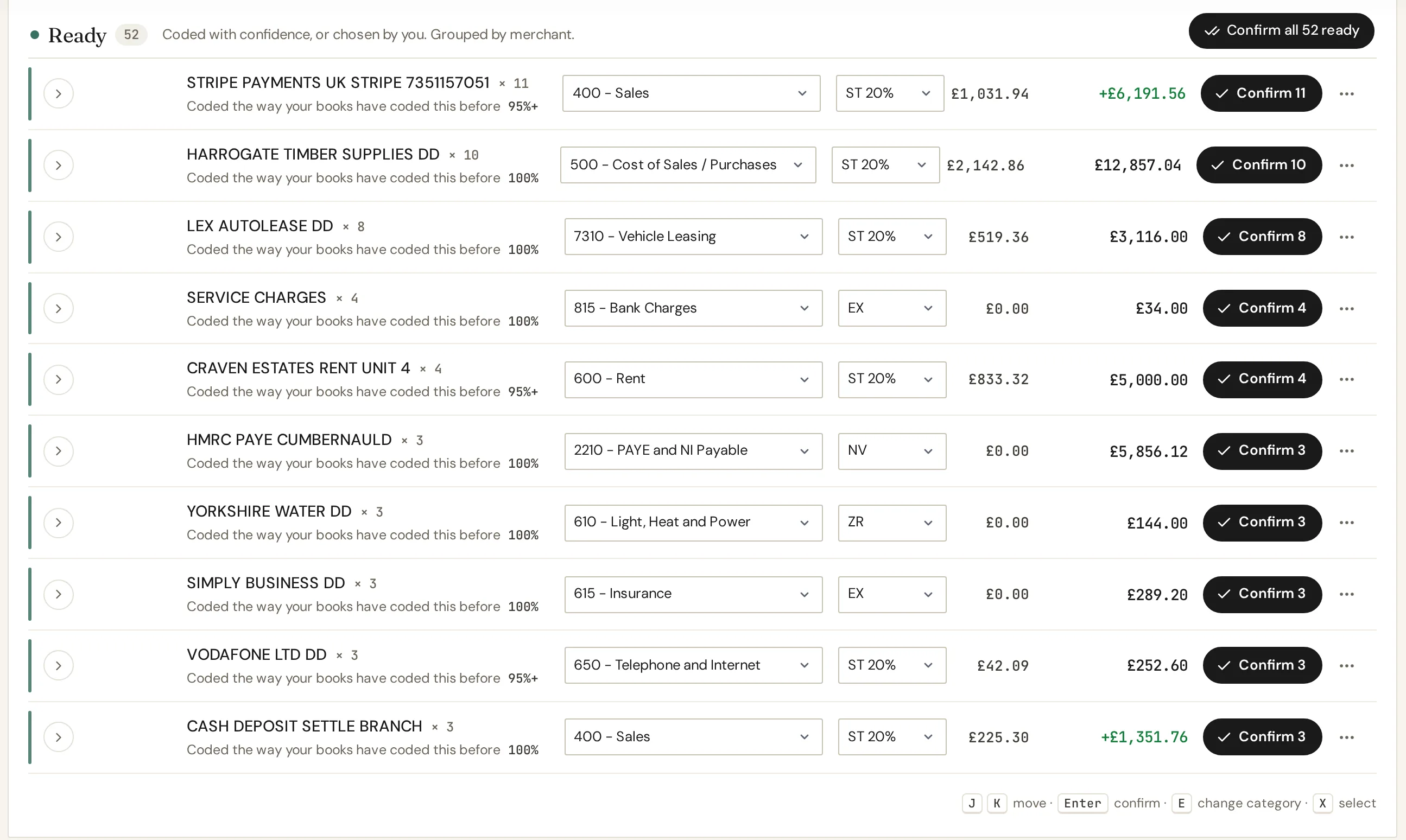
The biggest single use of bookkeeping AI. Bank rules match exact text and break when a payee changes; an AI reads the description, the amount and the history and chooses the account and VAT treatment the way a bookkeeper would. In our own test on a three-month feed, 31 well-built Xero bank rules reached 58% of 310 lines (the stress test is here). The rest is where AI does the work.
CodeIQ runs every line through an eight-phase pipeline: transfer detection, invoice matching, the client's own history, crowd-sourced patterns, merchant category, semantic reading, your corrections and finally VAT. It codes about 95% of recurring merchants and 80 to 85% of ones it hasn't seen before exactly as you would.
You still: review what it holds back, decide the genuinely ambiguous lines (goods or a service, capital or revenue), and post.
Bank reconciliation
Matching a statement to the books is pattern work: dates that drift by a few days, one payment that settles three invoices, descriptions that don't quite agree. AI-assisted matching handles the fuzzy cases and leaves you a short list of real differences instead of a long list of lines.
Bank Reconciler matches a statement in any format (CSV, Excel, PDF, a scan or a phone photo) against the books from Xero, QuickBooks, Sage or Pandle at about 5,000 transactions a second, and has a second method that matches invoices to the payments that settled them.
You still: decide what each genuine difference is, and approve the fixes that go back into the ledger.
Invoice and receipt capture
Reading a supplier invoice used to mean a template per supplier. AI vision models read the supplier, date, totals and VAT from almost any layout, including photos, and suggest the account. The step that matters is the next one: matching the document to the bank line it paid for, so it isn't entered twice.
CodeIQ reads PDF and image invoices in bulk and matches them to bank lines and outstanding invoices; receipt capture in IQ Books works the same way from a phone.
You still: check the extractions it marks as low confidence, especially VAT on mixed-rate invoices.
Management reporting and analysis
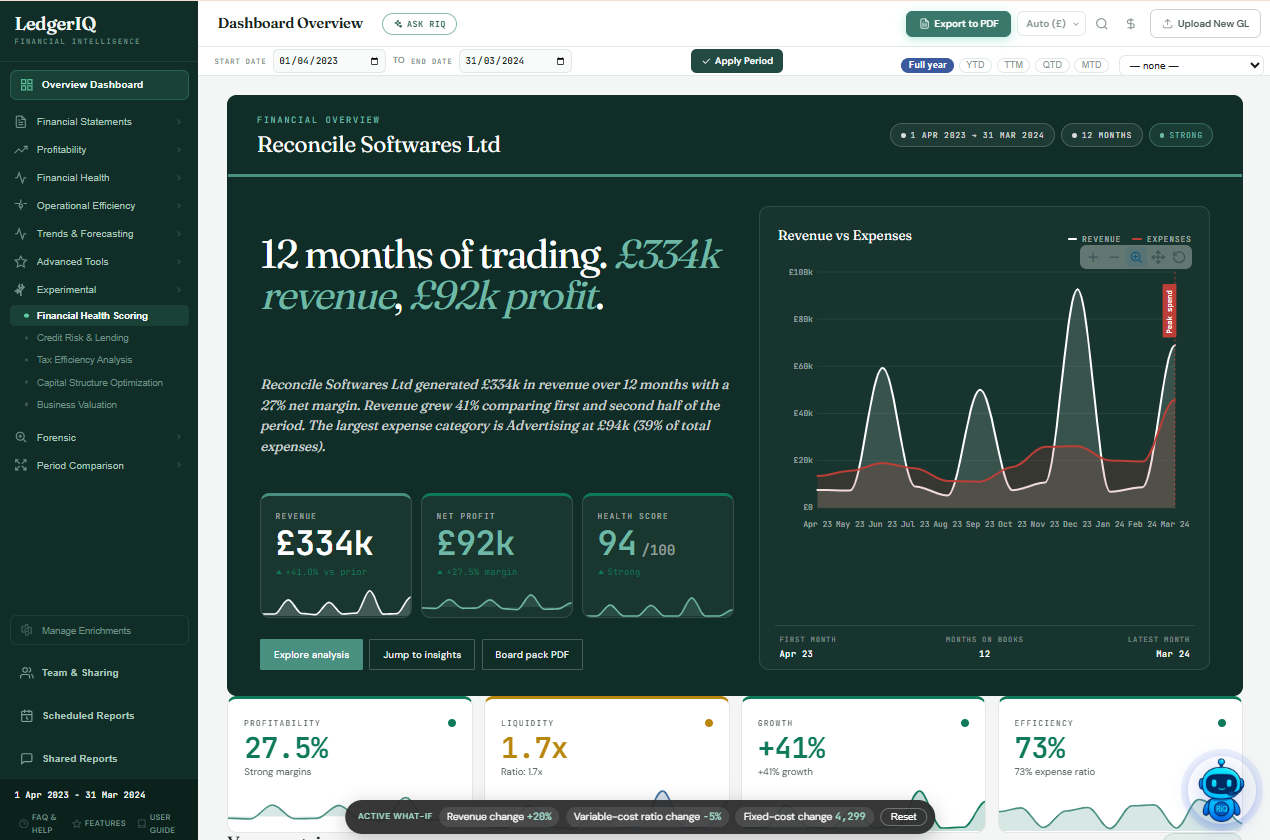
AI in management accounting, and AI in accounting and finance work generally, is less about the arithmetic, which spreadsheets have always done, and more about reading a whole general ledger and explaining it: which costs moved, where the margin went, how long customers take to pay, which entries look unusual. It turns a month-end into a conversation you can have with a client.
LedgerIQ reads a transaction-level general ledger export from any platform through 44 analysis modules (ratios, trends, forecasting, valuation, anomaly detection) and writes the narrative for a board pack. We tested its Benford's law screen on real ledgers.
You still: decide what the numbers mean for this client and what to advise.
Year-end working papers
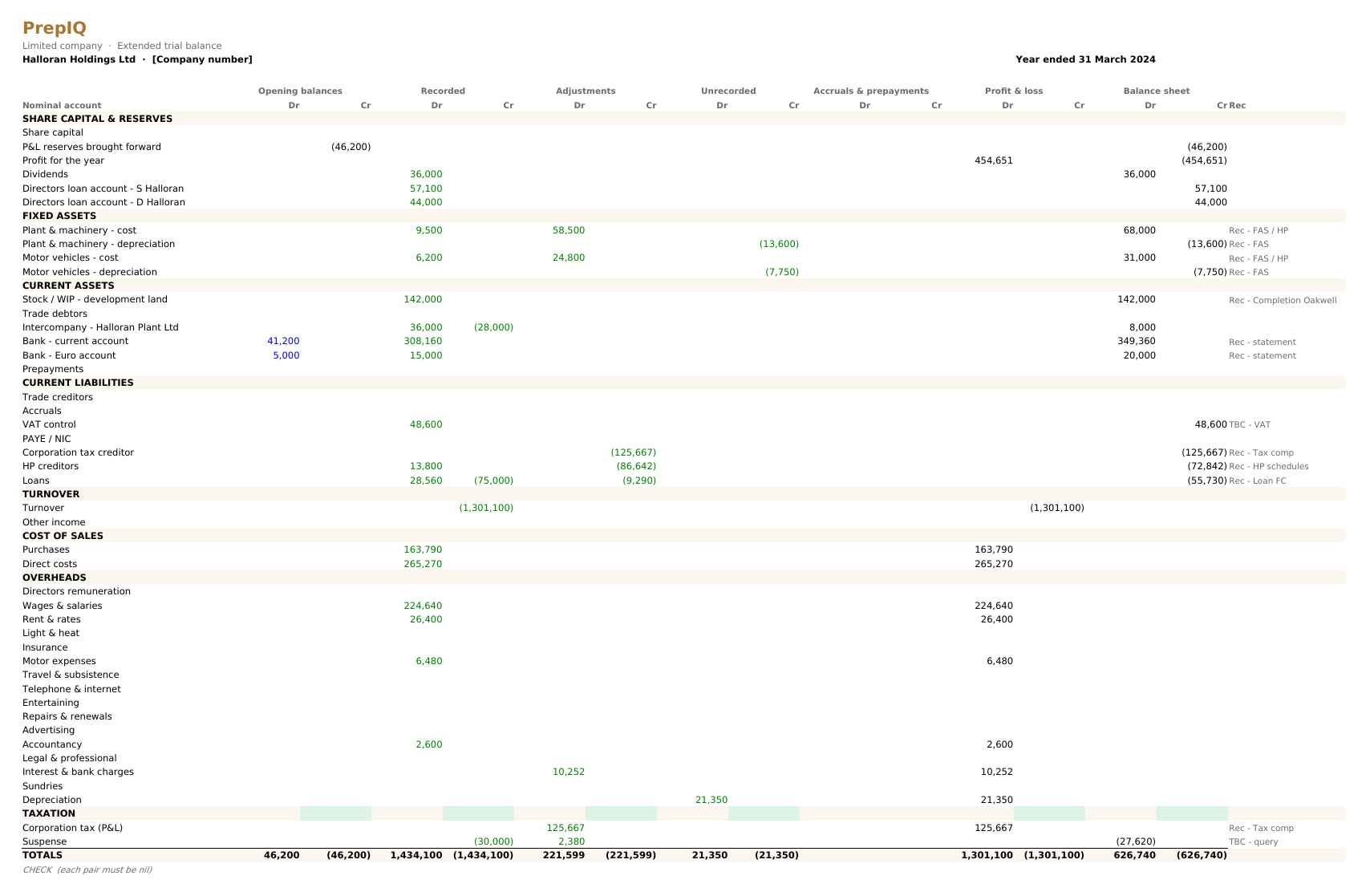
Accounts production software has turned a trial balance into statutory accounts for years. What eats the week is everything before it: the lead schedules, the accruals and prepayments, the fixed assets, the reconciliations, the tax computation and the list of questions for the client. That is the part AI can now prepare.
In the run we documented, PrepIQ read a limited company's ledger and thirteen supporting documents, posted seven adjusting journals, computed corporation tax under marginal relief and produced a balanced, cell-linked set in about thirteen minutes, leaving around 35 queries for a person (the full run is written up here).
You still: review every schedule, answer the judgement calls it flags, and sign off.
Client queries and drafting
A surprising amount of practice time goes on writing: the query list, the chaser, the explanation of why the tax bill went up. AI drafts these well when it has the facts in front of it, so the questions it writes come from the books, not from guesswork.
PrepIQ ends each job with a draft client email built from its own query list, and RiQ, the assistant across our tools, explains coding decisions and analysis in plain English.
You still: edit the tone, decide what to send, and own the advice.
Working from Claude
The newest change: an AI assistant such as Claude can be connected to a client's books through a connector (the Model Context Protocol), so you can ask "who owes us money, and which invoices are more than 60 days overdue?" or "code last month's bank for this Xero company" without opening the software. This is where the AI agent for accounting is heading: it works in the books, and you approve what it does.
Our connector works from Claude and ChatGPT. Every change is two steps: the assistant shows a plan that writes nothing, and only after you agree does it carry out that exact plan. Some things are not available through it at all, by design: filing a VAT return or anything else to HMRC, paying anyone, closing a year, or changing who has access.
You still: approve every change, and make every declaration yourself.
02 · Limitations of AI in accounting
What AI can't do in accounting.
The pros and cons of AI in accounting come down to one line: it is excellent at processing and poor at responsibility. These are the parts that stay with a person, and the reasons they do.
- The sign-off.An AI can prepare a set of accounts or a VAT return; it cannot be responsible for them. The declaration, the engagement and the professional liability are yours, which is why good tools never file or post on their own.
- Professional scepticism.AI takes the records at face value unless it is told otherwise. Noticing that a director's loan looks wrong, or that a supplier doesn't exist, needs a sceptical person who knows the client.
- Judgement on the unusual.Capital or revenue, a one-off settlement, a transaction with a connected party, a VAT treatment the rules leave open. AI can flag these and suggest; deciding is accounting judgement.
- Context the books don't hold.The client's plans, the conversation last month, the reason a cost doubled. Most of the value in advice comes from what is not in the ledger.
- Ethics and the relationship.Confidentiality, independence and telling a client something they don't want to hear are professional duties, not features.
The professional bodies say much the same. ICAEW's paper on the subject expects AI systems to take on more and more decision-making tasks, while listing professional scepticism and ethical decision-making among the qualities accountants have to keep. ACCA's guidance for practitioners is blunter:
"AI is powerful, but it's no replacement for human expertise."ACCA, In Practice: The future of accounting with AI
Where accounting and AI meet, the practical design rule is this: a tool should make it obvious which lines it decided and why, hold back the ones it is unsure of, and never let anything reach the ledger or HMRC without a person. If a vendor can't show you that, the risk is yours.
The question behind the question
Will AI take over accounting?
Will accounting be replaced by AI? Is accounting AI proof? Neither, quite. The processing will be automated, much of it; the profession will not. The impact of AI on accounting is a shift in where the hours go.
The keying, the coding and the first pass at reconciliation are already moving to software, and that part of a bookkeeper's week is shrinking fast. What grows is review, exceptions, advice and the client conversation, which is the work clients actually value and the work that carries the professional's name.
So is accounting safe from AI? The responsibility is. The parts that are only processing are not, and practices that plan for that are the ones that gain from it. Will bookkeeping be replaced by AI? Bookkeeping as data entry, largely yes; bookkeeping as keeping a client's records right, no.
We looked at the evidence in more detail, including the research on what happens to firms that adopt AI, in Will AI replace accountants? The honest answer. For a client-facing version of the same question, see Can ChatGPT do my bookkeeping?
The future of AI in accounting, on current evidence, is less staff doing data entry and the same number of people doing more valuable work, with the firms that review well pulling ahead of the firms that key well.
03 · Using AI responsibly
The risks of AI in accounting, and how to manage them.
None of these is a reason not to use AI. Each is a reason to choose the tool carefully and to write down how your practice uses it.
- Client data and UK GDPRAn AI provider that processes client records is a processor of personal data. You need a lawful basis, a data processing agreement, and a privacy notice that tells clients. For new uses, a data protection impact assessment is the sensible step. The ICO's Guidance on AI and data protection covers DPIAs, transparency, accuracy and fairness, and is currently under review following the Data (Use and Access) Act.
- Confidentiality and trainingThe difference that matters is between consumer AI apps and business or API services. Check, in the terms, whether your inputs can be used to train the provider's models. Never paste client records into a personal account.
- Wrong answers that look rightLanguage models can state a wrong figure confidently. Use AI on work you can check: coding you review before posting, schedules that tie out to the trial balance, analysis you can drill back to the entries.
- No audit trailIf you can't see why a line was coded or a journal posted, you can't defend it. Ask for the reason and the source on every AI decision, and keep it.
- Skills that fadeWhen the software does the first pass, juniors see less of the basics. Keep review as a training ground: the held-back lines are where people learn.
- Lock-inMake sure clients' books can be exported in a usable format, and that the AI's work sits in the ledger, not only inside the vendor's tool.
- How we handle itWe use two model providers through their developer APIs, Google's Gemini API and Anthropic's Claude API, under commercial terms that say inputs are not used to train their models, and we don't send account numbers or online banking credentials. Client records are used to do the work: they are not sold, and the only wider use is anonymised merchant patterns that improve suggestions, which you can opt out of. The detail is in our privacy policy.
04 · Choosing AI accounting software
Ten questions to ask before you choose.
There is no single best AI for accounting, or best AI for accountants: the right AI tools for accounting depend on the job. These questions separate the best AI accounting software, the kind that does the work inside the books, from accounting AI tools that only suggest, whichever vendor you are looking at.
- Where does client data go, and is it used for training?Ask for the named model providers, the terms, and the data processing agreement.
- Does anything post or file without a person?The answer you want is no, with any auto-posting off by default and listed line by line.
- Can I see why it decided each line?A confidence, a reason and the source for every decision.
- What does it do when it isn't sure?It should hold the line with the question it couldn't answer, not guess.
- How accurate is it on my clients?Ignore headline percentages and run a real client month through it in parallel.
- Does it work with the ledgers my clients already use?Xero, QuickBooks, Sage, Pandle, or its own, without moving every client.
- Does it know UK rules?VAT treatments, reverse charge, CIS, Making Tax Digital and UK corporation tax, not a US product with the labels changed.
- Does it learn from corrections?A correction should change what happens next time for that client.
- What does it really cost at volume?Per user, per client, per document or per line, and whether manual work is free.
- What happens if we leave?Full exports, in formats another system can import.
Comparing specific AI accounting tools? Our comparison of CodeIQ with Booke.ai, JAX and others and the best AI bookkeeping and accounting software in the UK set the main options side by side.
05 · How to use AI in accounting
A first month, without betting the practice.
Using AI in accounting works best as a controlled trial on one bottleneck, measured against the way you do it now, before it touches every client.
Pick one bottleneck
The job that eats the most hours for the least judgement. In most practices that is bank coding, followed by reconciliation and year-end schedules.
Run one client month in parallel
Do it the usual way and with the tool, then compare. Count the corrections, not the claims: that number is your real accuracy.
Write the review rule down
Who reviews what the AI prepares, what gets checked line by line, and what can be sampled. Then update your privacy notice and engagement letter.
After that, extend it one client and one task at a time. Free AI tools for accounting are fine for drafting and research; for client books, use AI accounting software built to work inside the ledger, with the controls above. If you want to try ours on a real month, a free account includes 1,000 credits and the whole IQ Books ledger, and coding by hand is always free.
06 · AI in accounting software: ReconcileIQ
Where our AI does the work, and where you do.
ReconcileIQ is accounting AI software built for UK practices, AI tools for accountants in five products that work on whichever ledger each client uses, on one practice plan. Here is what each one prepares and what it leaves for you.
| Product | What the AI prepares | What stays with you | Credits |
|---|---|---|---|
| CodeIQAI bookkeeping | Codes the bank through eight phases, sorts VAT, matches invoices and pairs transfers, then posts to Xero, QuickBooks, Sage or Pandle. | Reviewing held-back lines and posting. | 4 a line |
| Bank ReconcilerReconciliation | Matches any statement to the books and invoices to payments, and lists the real differences. | Deciding each difference and approving fixes. | 1 a bank line |
| LedgerIQAnalysis | Reads the general ledger through 44 modules and writes the board-pack narrative. | What it means for the client, and the advice. | 1,000 an analysis |
| PrepIQYear-end working papers | Prepares the working papers set from the client's records, cell-linked, with the judgements flagged. UK and Ireland. | Review, the judgement calls and sign-off. | 5,000 a job |
| IQ BooksThe ledger | A double-entry ledger that codes its own bank feed, with MTD filing free on every plan. | Review, VAT returns and submissions. | Manual work free |
| Claude connectorAI assistant | Answers questions about the books and plans changes from a conversation. | Approving every change; filing and payments stay in the app. | Reading is free |
Practice plans start at £78 a month with 50,000 credits, 50 client accounts and PrepIQ; see practice pricing. Credits only pay for automation: anything you do by hand is free. Prices exclude VAT.
Questions
What accountants ask about AI.
What is AI in accounting?
AI in accounting means software that does work a person used to do by reading and judging, not just by following a fixed rule: coding bank lines from their descriptions, reading invoices, matching a statement to the books, explaining a set of accounts in plain English, or preparing year-end schedules. Good AI accounting software shows its reasoning, holds back what it is unsure of and leaves the sign-off to you.
How is AI used in accounting?
Mostly on high-volume, repeatable work: coding bank transactions and VAT, reconciling the bank, capturing invoices and receipts, analysing the general ledger for management reporting, preparing year-end working papers and drafting client queries. Increasingly, accountants also ask an AI assistant such as Claude questions about a client's books directly, through a connector that reads the ledger.
Will AI take over accounting?
AI is taking over a large share of the processing, the keying and checking that fills a bookkeeper's week. It is not taking over the accountant's responsibility: judgement on unusual items, professional scepticism, ethics, the client relationship and the sign-off stay with a person. The practical effect is that the work moves from doing to reviewing.
What is the best AI for accountants?
It depends on the job. A general assistant such as Claude or ChatGPT is good for drafting, research and explaining, but it is not connected to a ledger unless you connect it. For the bookkeeping itself you want AI accounting software that works inside the books, shows why it coded each line, holds back what it is unsure of and never posts without review. Test any tool on a real client month before you decide.
Is it safe to use ChatGPT or Claude with client data?
It can be, if you use a business or API service whose terms say your inputs are not used to train its models, you have a lawful basis and a data processing agreement in place, and your privacy notice tells clients. Pasting client records into a personal consumer account is a different matter. Treat any AI service as a processor of client data and check its terms before you use it.
Can AI do bookkeeping?
Yes, most of it. AI bookkeeping software can code the bank, sort the VAT, match invoices and pair transfers, then leave the lines it is unsure of for a person. CodeIQ codes about 95% of recurring merchants and 80 to 85% of ones it has not seen before exactly as you would; anything it is not sure of waits for you, and nothing posts until someone posts it.
Can AI prepare year-end accounts?
It can prepare the working papers behind them. In the run we documented, PrepIQ read a limited company's ledger and thirteen supporting documents, posted seven adjusting journals, computed corporation tax under marginal relief and produced a balanced, cell-linked set in about thirteen minutes, leaving around 35 queries for a person. The review and the sign-off stay with the accountant.
Do clients need to know we use AI?
Under UK GDPR's transparency principle, clients should be told how their personal data is processed and by whom, which includes AI providers acting as processors. Most firms cover this in their privacy notice and engagement letter. It is also good practice to say which work AI prepares and that a person reviews it.
How much does AI accounting software cost?
Pricing models vary: per user, per client, per document or per transaction. ReconcileIQ uses credits that only automation draws on. A free account starts with 1,000 credits, coding a bank line with CodeIQ uses 4 credits, and coding lines yourself is always free. Practice plans start at £78 a month with 50,000 credits, 50 client accounts and PrepIQ.
Sources: ICO, Guidance on AI and data protection (last updated 15 March 2023; under review following the Data (Use and Access) Act). ICAEW, Artificial intelligence and the future of accountancy (2017, reviewed August 2024). ACCA, The future of accounting with AI (In Practice, February 2025). Product figures are from our own published tests and pricing. This guide is general information, not legal advice.
Try it on one client
Run one client month through it. Count the corrections.
Open a free account, take a real client month through CodeIQ, Bank Reconciler and LedgerIQ on whichever ledger they use, and compare it with how you do it now. When it earns its place, a practice plan adds PrepIQ and covers every client.